Claude Threads Guide: How to Connect Claude to Threads


A Claude Threads setup takes one connector. Connect Claude to Threads, and it can write, schedule and check your posts without leaving the chat. Setup takes about 2 minutes. You don’t need a Meta developer app.
Looking for “threads” inside the Claude API? That’s a different feature. This guide is about Threads, the social app from Meta.
I’m Anton, founder of PostHero. I built our Claude connector, and now I write almost all of my Threads content in Claude. Below you’ll find the setup, what Claude can do on Threads, and the weekly system I run with it. I also cover Meta’s rules, how the options compare, and the prompts I use.

 Setup · 2 minutes
How to connect Claude to Threads
One connector for 8 platforms. Set it up once, and Claude can work on your Threads from any chat.
- Posts and threads
- Up to 20 images
- Scheduling
- Analytics
Step 1: Connect your Threads account
Create a PostHero account and connect your Threads account. Threads asks you to approve access on its own screen, so Claude never sees your password.
Hide screenshotShow screenshot

Step 2: Add the connector in Claude
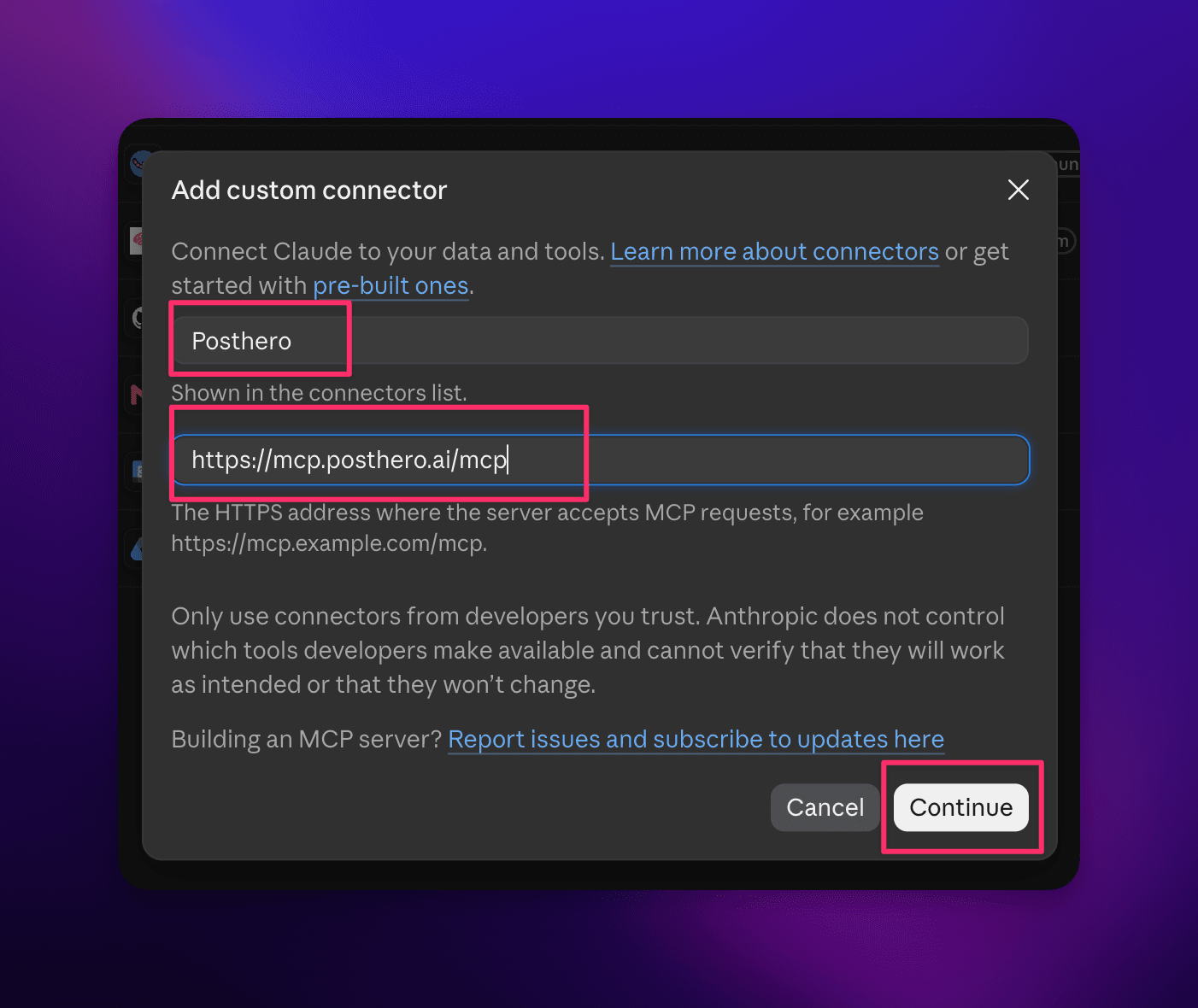
In Claude, open Customize > Connectors, click + Add, then Add custom connector. Name it PostHero, paste the URL and click Continue.
Hide screenshotsShow 2 screenshots
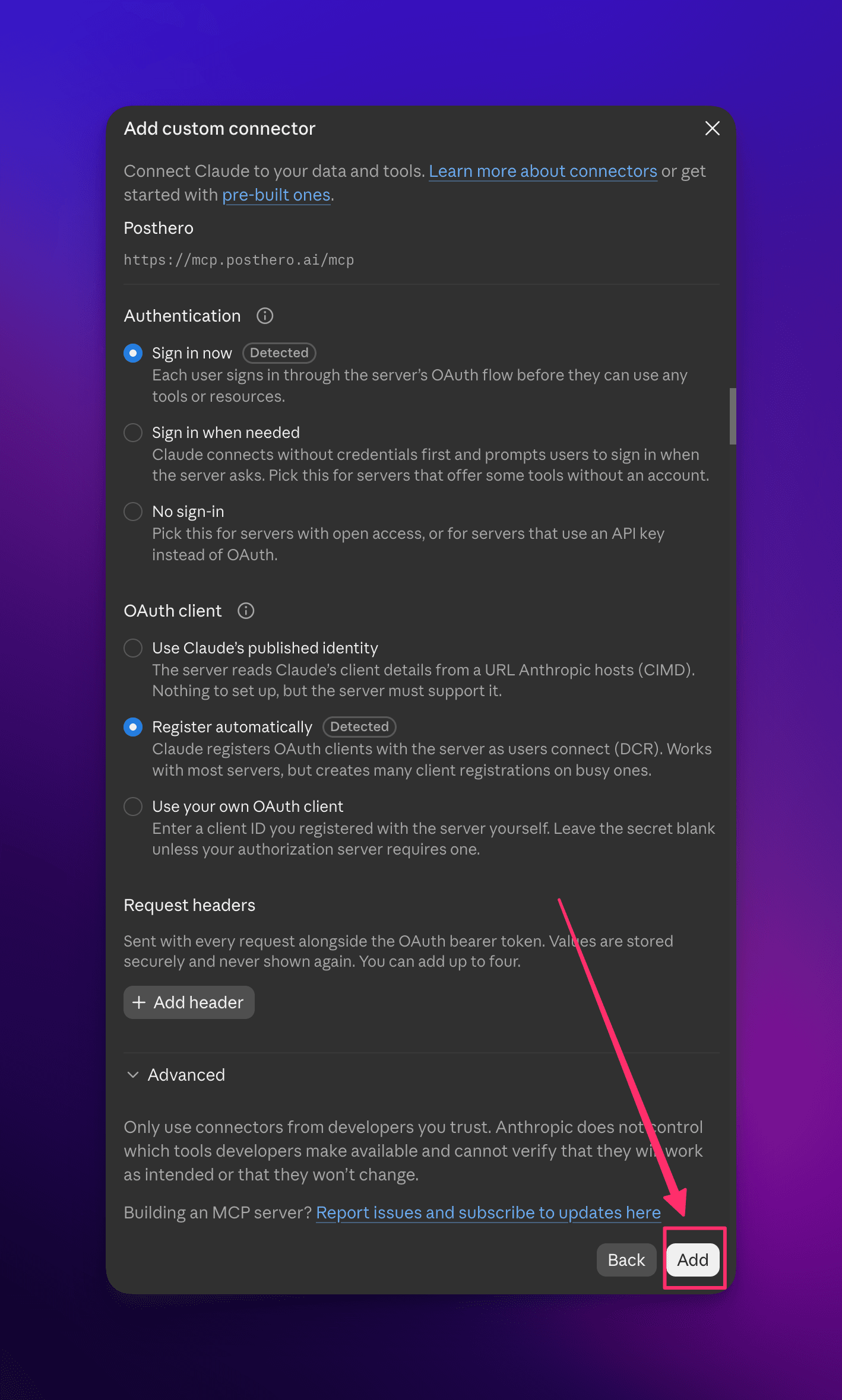
Then keep the defaults (“Sign in now”, “Register automatically”) and click Add.
Step 3: Sign in and allow access
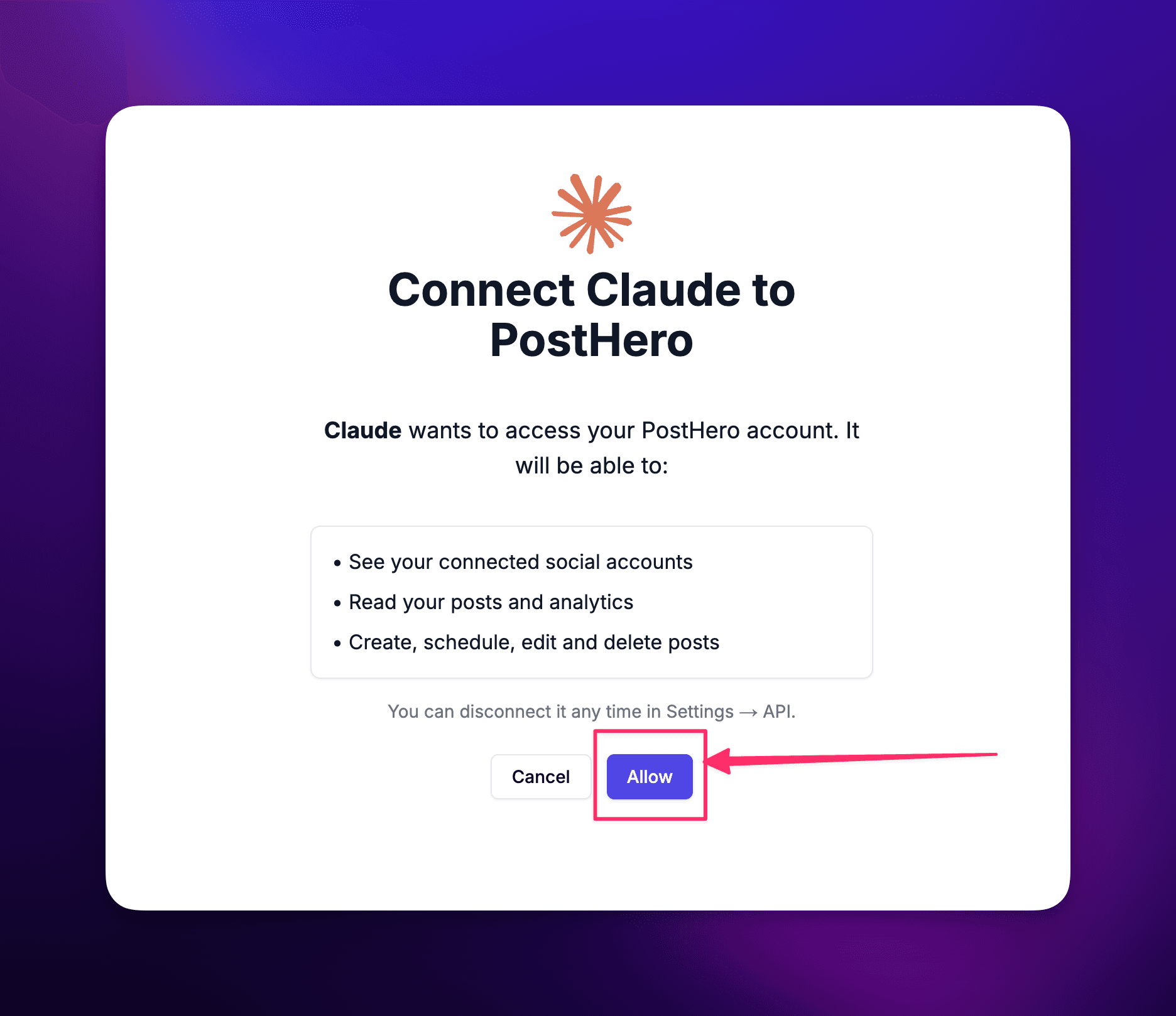
Sign in to PostHero with the same account you used in step 1 and click Allow.
Hide screenshotShow screenshot
Step 4: Turn it on and test it
In a new chat, turn PostHero on under + > Connectors and ask:
List my connected accounts
What you need for Threads specifically
- A normal Threads profile. You connect it through Threads’ own login screen. So Claude never sees your password.
- No developer app. PostHero handles the Threads API for you. If you build it yourself, you need your own Meta app, approval to publish, and new access tokens every 60 days.
- Any Claude plan. The Free plan allows one custom connector, and that’s all you need.
Got more than one Threads account? Connect them all in PostHero, and Claude sees each one. Also, the same connector covers your other platforms. Here’s how to connect Claude to all your social media.
Can Claude post to Threads?
Yes, once it has a connector. On its own, Claude can only write a post for you to copy. With PostHero, it can save the post as a draft, schedule it, or publish it when you say so. After that, it can check how the post did.
Here’s what Claude can do on Threads through PostHero:
- Text posts up to 500 characters.
- Multi-post threads. Claude writes the whole chain and saves it as one draft.
- Images or video: up to 20 images per post, or one video. First upload your files to your PostHero media library. Then tell Claude to use them.
- Scheduling for any date and time you give it.
- Analytics: impressions, likes, replies, reposts and quotes, plus your top posts.
- Own text per account when one idea goes to several Threads accounts.
In short, it’s the same toolkit as on X, with more room per post. However, the viral library and competitor tracking are Instagram only for now. The Instagram guide covers them.
How I use Claude for Threads
I didn’t believe this until I tried it: good Threads content with AI is easy now. Not “fine for AI” good. Actually good.
But you need two things. First, a system. Second, real input from you: your stories, your opinions, what happened this week. Skip either one, and you get the same AI slop everyone scrolls past.
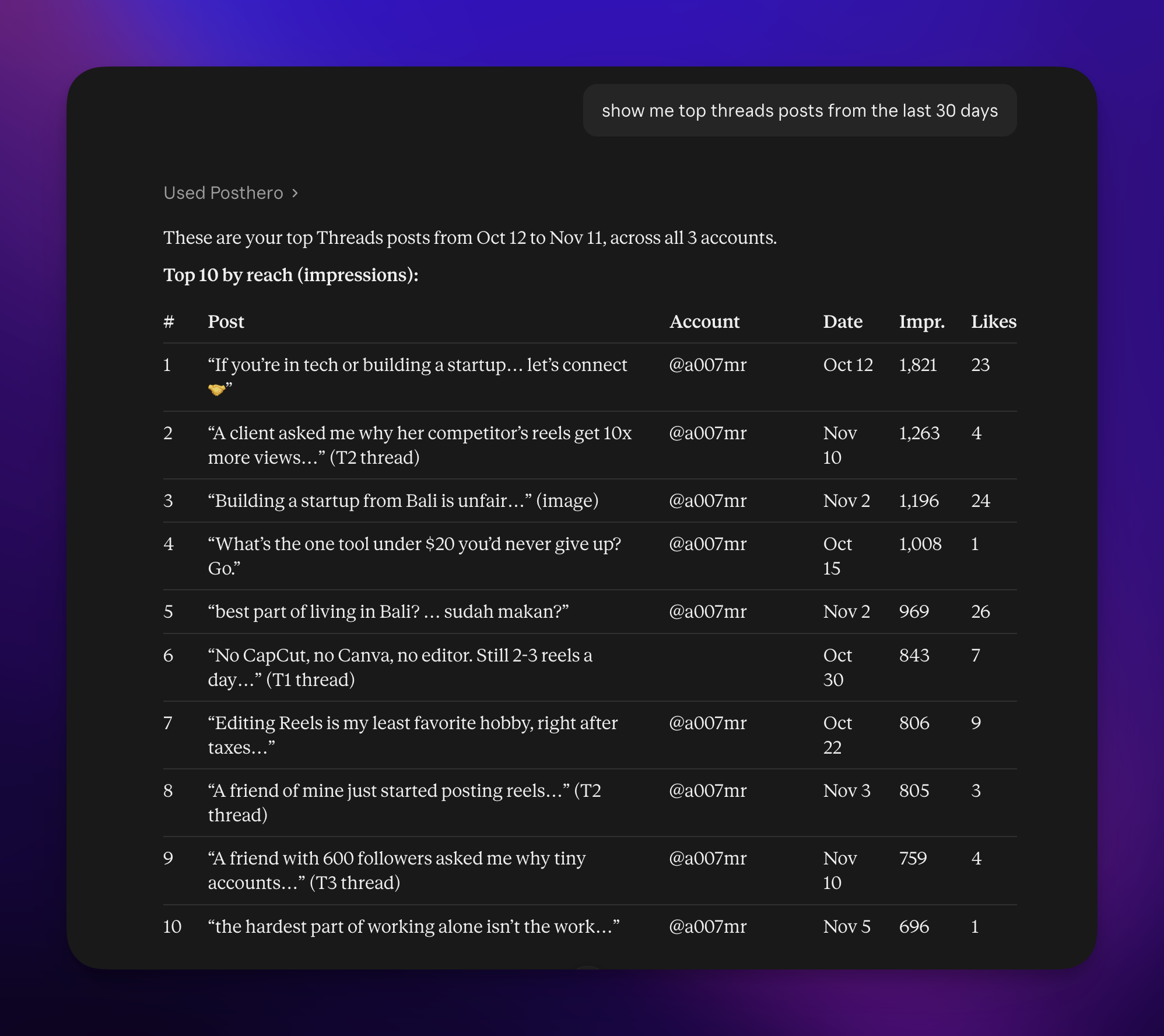
Here’s an example from my own account. My top post on @a007mr in the last two months started like this:
I moved to Bali 6 years ago, at 34. No friends here, no experience doing this, just a pull to try it.
Here’s what I’ve learned since:
Then came a thread of lessons. It reached 10,900 impressions, 115 likes and 25 replies. Claude helped me shape it, but the story was mine. That’s why it worked.
Over the same 60 days, the account got about 48,000 impressions. I wrote the content in Claude and scheduled it through PostHero.
Why Threads is the best place to test
The biggest difference between Threads and LinkedIn isn’t tone. It’s how many tests you can run.
On Threads, you can post every day, even several times a day. And it works. Each post is a small test: a new hook, a new format, or a new angle. So more posts give you more data. In turn, more data gives you new ideas to try next week.
On LinkedIn, that pace would tire out your audience long before you learned anything.
Every week I ask Claude to look back at what worked, then I plan the next round of tests from that:
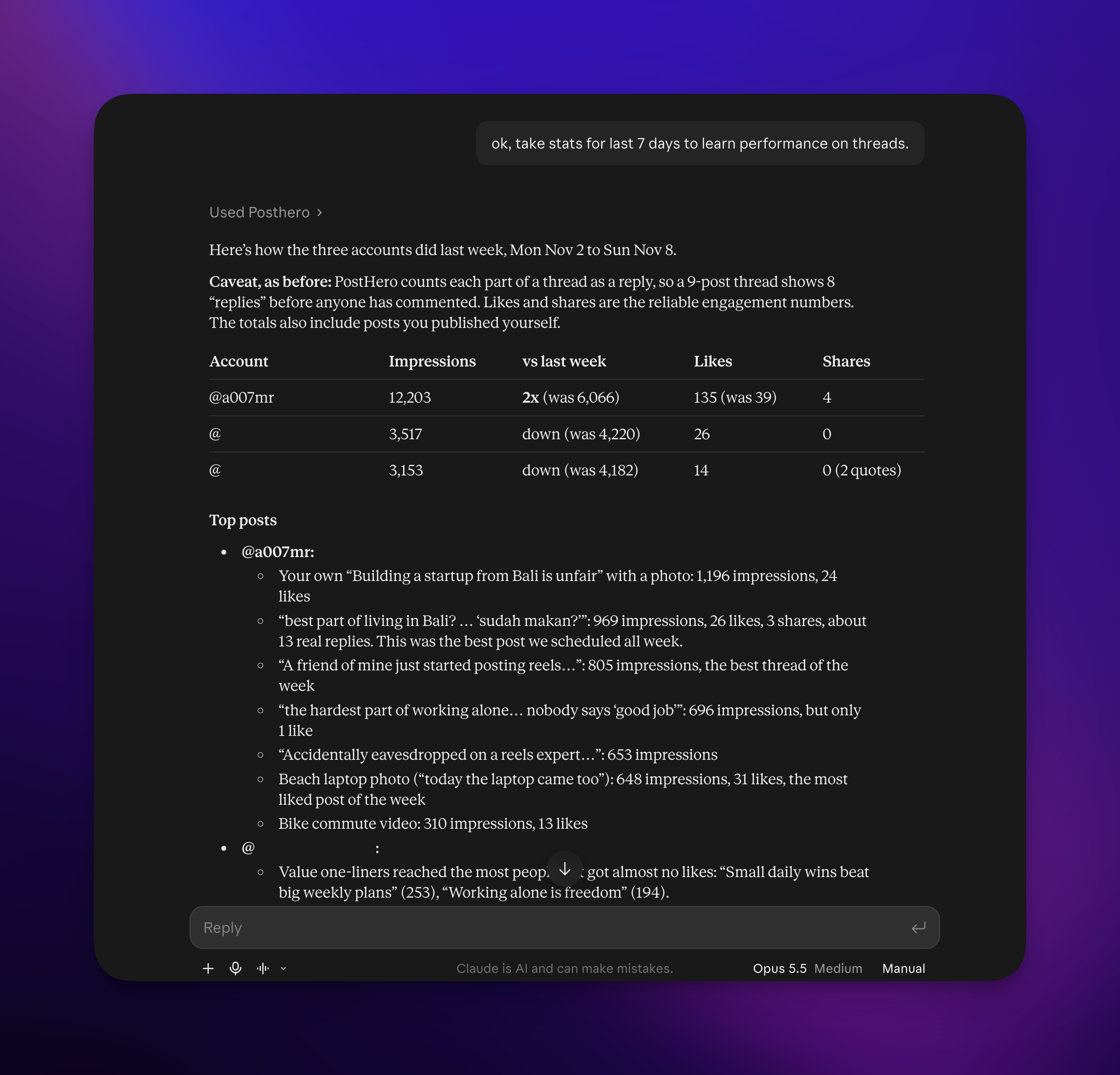
That’s why Claude fits Threads so well. Volume is the part people hate, and Claude is good at it. Just make sure the ideas come from you.
My weekly Threads system
I turned the whole process into a Claude skill. Now a week of Threads content starts from one message. Here’s how it works:
- Pick one topic for the week. Mine are usually about AI, marketing or startups. Claude checks my recent topics, so I don’t repeat myself.
- Write 9 core pieces. That’s 3 expert threads, 3 short text tips and 3 image posts about work and life in Bali. I review and edit these first.
- Build the week grid. Claude plans every slot: day, account, time, format and core piece. As a result, no two accounts post the same piece on the same day.
- Write the variations. Each time a piece is reused, Claude gives it a new hook. It also rewrites it in that account’s voice.
- Save everything as drafts. I check the week day by day. Then the drafts go to PostHero with their times.
I also keep a few rules in the skill. The main value always goes in the first post. Every post stays under 500 characters. And Claude never makes up a link or a number.
You don’t need the full system to start. This prompt gets you most of the way:
This week’s Threads topic is [topic]. First write 9 core pieces and show them to me: 3 threads of 7 posts with expert material, 3 short text insights, and 3 personal posts based on these stories from my week: [stories]. After I approve them, turn them into 3 posts a day for 7 days, each with its own hook, every post under 500 characters. Save them as drafts, not published.
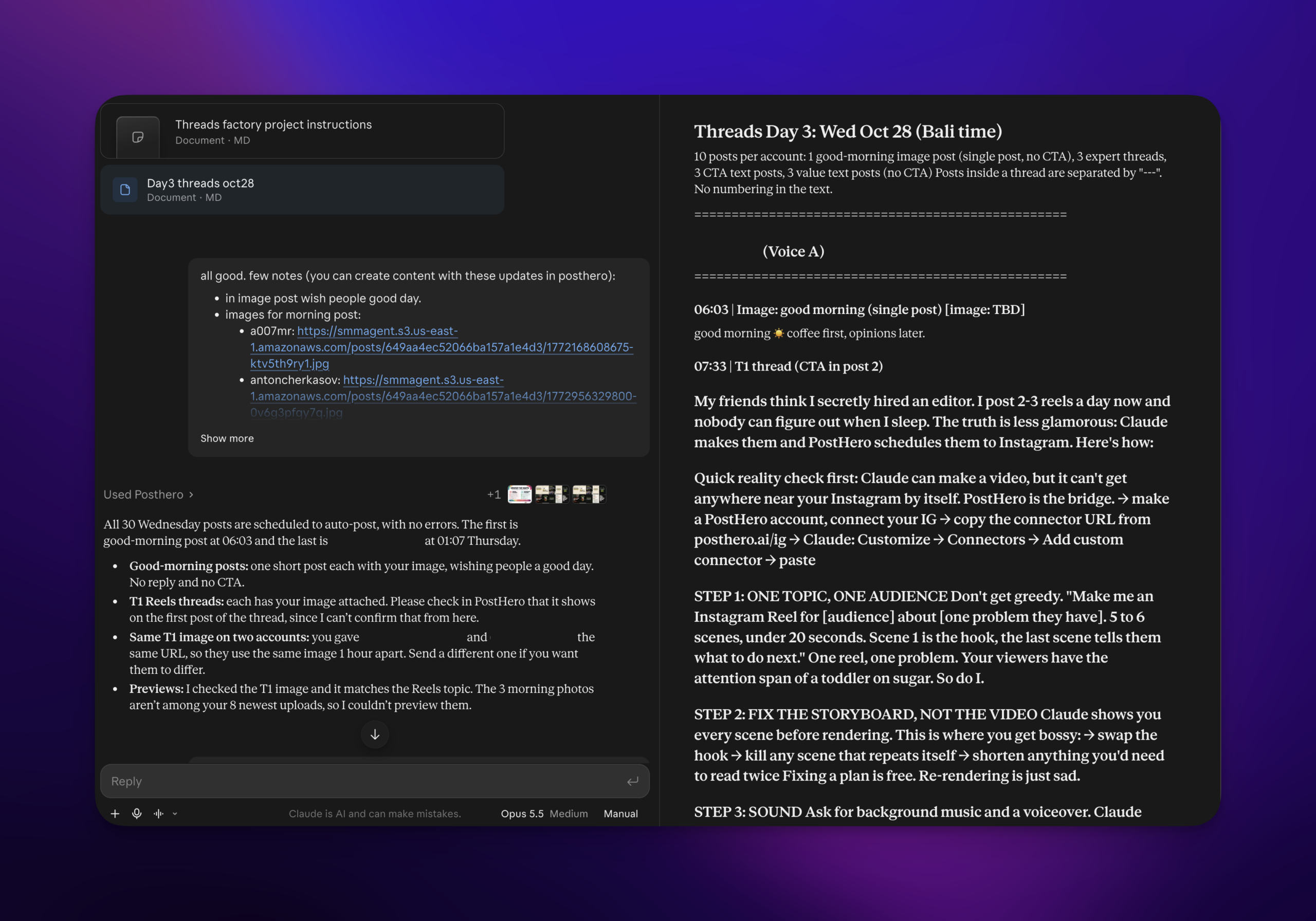
Threads rules for apps that post for you
Threads has fewer automation rules than X. Still, a few apply to anything Claude publishes.
500 characters per post. This is the top reason posts fail when people copy them from LinkedIn. If an idea needs more room, ask Claude to turn it into a thread.
Posting caps. Threads allows 250 posts per profile in 24 hours, plus 1,000 replies. A normal schedule never comes close. You’d only hit it by asking Claude to publish 40 posts at once.
Don’t post the same text from several accounts. Meta’s spam policy counts repeated content as a spam signal. Meta has also cut the reach of accounts that share identical posts. So give each account its own version. With PostHero, Claude writes one per account:
Post this idea to both my Threads accounts, but write each one its own version with its own hook: personal and story-led for my personal account, shorter and more practical for the brand account. Save both as drafts.
AI labels. Meta asks for an AI label on realistic AI video or audio. Images don’t need one, but Meta may still label them. Text written with Claude needs no label.
Keep a human in the loop. Everything Claude makes in PostHero starts as a draft. It schedules only when you give it a time. And it publishes only when you say so and confirm once more. At 20 posts a week, that review step is what keeps a system from turning into spam.
Claude Threads connectors, compared
Claude has no official Threads connector. So every option is a third-party tool or something you build. The main difference: some tools publish to your account, while others only read your data.
| Option | Networks | Publishes | Developer app | Stands out for |
|---|---|---|---|---|
| PostHero | 8 | ✅ Draft first, then schedule | ✅ Not needed | Write, schedule and analyze in one chat |
| Blotato | 9 | ✅ Yes, with scheduling | ✅ Not needed | Publishing from n8n or Make |
| Composio | Many apps | ✅ Posts now, no scheduling | ✅ Not needed | Threads next to other work apps |
| Windsor.ai | Many data sources | ✅ Yes | ✅ Not needed | Reporting across marketing data |
| Mysocial | Several | ❌ Can’t publish, reads only | ✅ Not needed | Analyzing your posts and audience |
| DIY with the Threads API | Threads | If you build it | ❌ Required | Full control |
Based on each vendor’s own pages, checked 11 November 2026.
Here’s the honest version:
- Pick PostHero if you want to run your Threads from Claude, whether that’s one account or many. Claude writes your posts and threads, schedules them, and checks your numbers, all in one chat. Everything waits as a draft until you approve it.
- Pick Blotato only if you build your posting flows in n8n or Make rather than in a chat. Just to know: its MCP access isn’t part of the free trial.
- Pick Composio if Threads is one of many work apps you want Claude to use. Just know it can’t schedule posts.
- Pick Windsor.ai if you report on Threads next to ads and other marketing data.
- Pick Mysocial only if you just want to read your stats. It can’t publish, so you’d still need another tool to post. PostHero gives you the stats too, plus the posting.
Copy-paste prompts for Threads
Swap the bits in brackets for your own.
Get ideas from your own week
Based on what we’ve talked about this week, give me 7 things I could post on Threads. Each one should come from something that actually happened to me, not general advice. One line per idea.
Turn a story into a thread
Here’s a story from my week: [story]. Turn it into a Threads thread of 5-7 posts. The first post is a plain, personal opening line that makes people want to read on. Every post under 500 characters, no hashtags. Show me before saving it as a draft.
Test hooks (the Threads advantage)
Write 3 versions of this idea for Threads, each with a different type of hook: a personal story, a bold opinion, and a question. Same core message. Schedule them on 3 different days this week at [time], as drafts I can review first: [idea]
Adapt from LinkedIn or X
Here’s my post from [LinkedIn/X]. Rewrite the idea for Threads from scratch: conversational, under 500 characters, or a short thread if it needs more room. No corporate tone, no call to action. Save it as a Threads draft.
Review and plan the next test
Show me my top 10 Threads posts from the last 30 days by impressions. What do the best hooks have in common, which formats did best, and what 3 tests should I run next week?
Using ChatGPT instead?
The same connector works there too. PostHero uses MCP, the standard both Claude and ChatGPT use for connectors. So add the same URL (https://mcp.posthero.ai/mcp) as a custom connector in ChatGPT, and sign in to PostHero. You’ll see the same Threads accounts, drafts and analytics. Every prompt in this guide works there too. I explain why I built it for any AI agent in PostHero goes agentic.
Why isn’t Claude posting to Threads?
- The connector is off in this chat. You turn connectors on for each chat. Click +, open Connectors and turn PostHero on.
- Claude finds no Threads account. You probably signed in to the wrong PostHero account. Sign out of the connector, then sign in with the account that has Threads.
- The draft saved but won’t publish. Usually one post is over 500 characters. Ask Claude to shorten it or split it into a thread.
- Your image won’t attach. Claude can’t send files from the chat to PostHero. Upload the image to your PostHero media library first, then give Claude its link.
- Nothing appeared on Threads. That’s on purpose: Claude saved a draft. Give it a time to schedule, or tell it to publish now and confirm.
FAQ
Can Claude post to Threads on its own?
No. Claude has no built-in link to Threads. It can write posts as text, but it needs a connector like PostHero to save, schedule or publish them.
Can Claude write multi-post threads for Threads?
Yes. Ask for a thread, and Claude writes it as separate posts under 500 characters each. It saves them as one draft, so you can edit before scheduling.
Is it free to connect Claude to Threads?
On the Claude side, yes. The Free plan supports one custom connector. Also, PostHero has a 7-day free trial, so you can test the whole workflow first.
Will Claude post to Threads without asking me?
No. Everything starts as a draft. To publish, you need to say so and then confirm once more.
Can I manage several Threads accounts from Claude?
Yes. Connect them all in PostHero and tell Claude which one to use. If one idea goes to several accounts, ask for a separate version for each. Meta treats identical posts across accounts as a spam signal.
Does it work with my other platforms too?
Yes. The same connector covers LinkedIn, X, Instagram, Facebook, YouTube, TikTok and Bluesky. The X guide is the closest match to Threads. And the guide to connecting Claude to social media shows what Claude can do on each platform.
PostHero for Claude
Run your Threads from Claude
Connect in 2 minutes. Turn your real stories into a week of Threads posts, and approve every one before it goes out.
7-day free trial. Everything starts as a draft.