Claude LinkedIn Guide: How to Connect Claude to LinkedIn


A Claude LinkedIn setup takes one connector: connect Claude to LinkedIn once, then write, schedule and track posts on your profile or company page without leaving the chat. Setup takes about 2 minutes, and you don’t need a LinkedIn developer app.
I’m Anton, founder of PostHero. PostHero started as a LinkedIn tool, I built our Claude connector myself, and I also write LinkedIn posts for clients. This guide covers the setup, what Claude can actually do on LinkedIn, the one habit that made my best post last month, LinkedIn’s rules, how the options compare, and the prompts I use.

 Setup · 2 minutes
How to connect Claude to LinkedIn
One connector for 8 platforms. Set it up once, and Claude can work on your LinkedIn from any chat.
- Posts and PDF carousels
- Viral post library
- First comment
- Scheduling
Step 1: Connect your LinkedIn account
Create a PostHero account and connect your LinkedIn account. LinkedIn asks you to approve access on its own screen, so Claude never sees your password.
Hide screenshotShow screenshot

Step 2: Add the connector in Claude
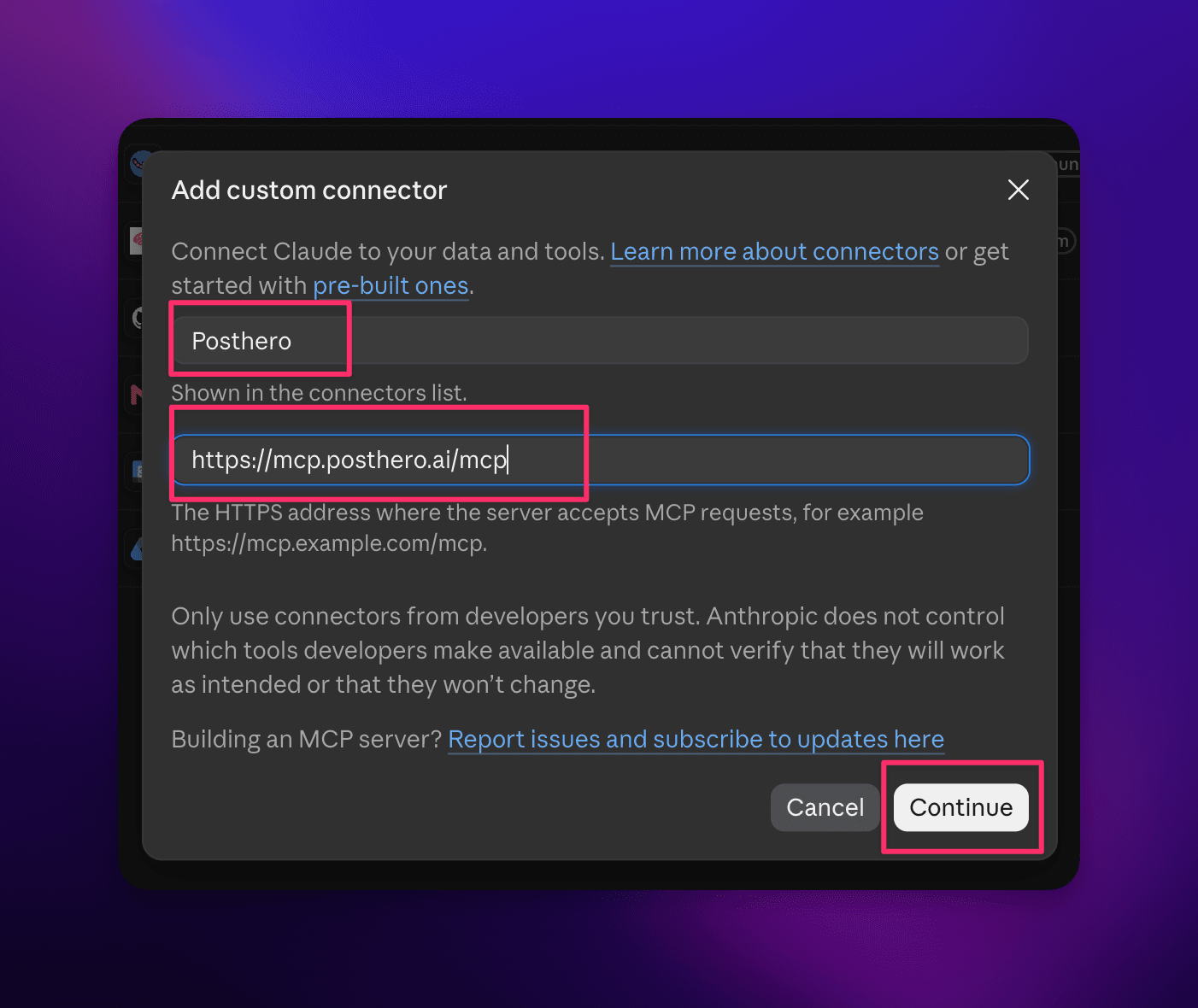
In Claude, open Customize > Connectors, click + Add, then Add custom connector. Name it PostHero, paste the URL and click Continue.
Hide screenshotsShow 2 screenshots
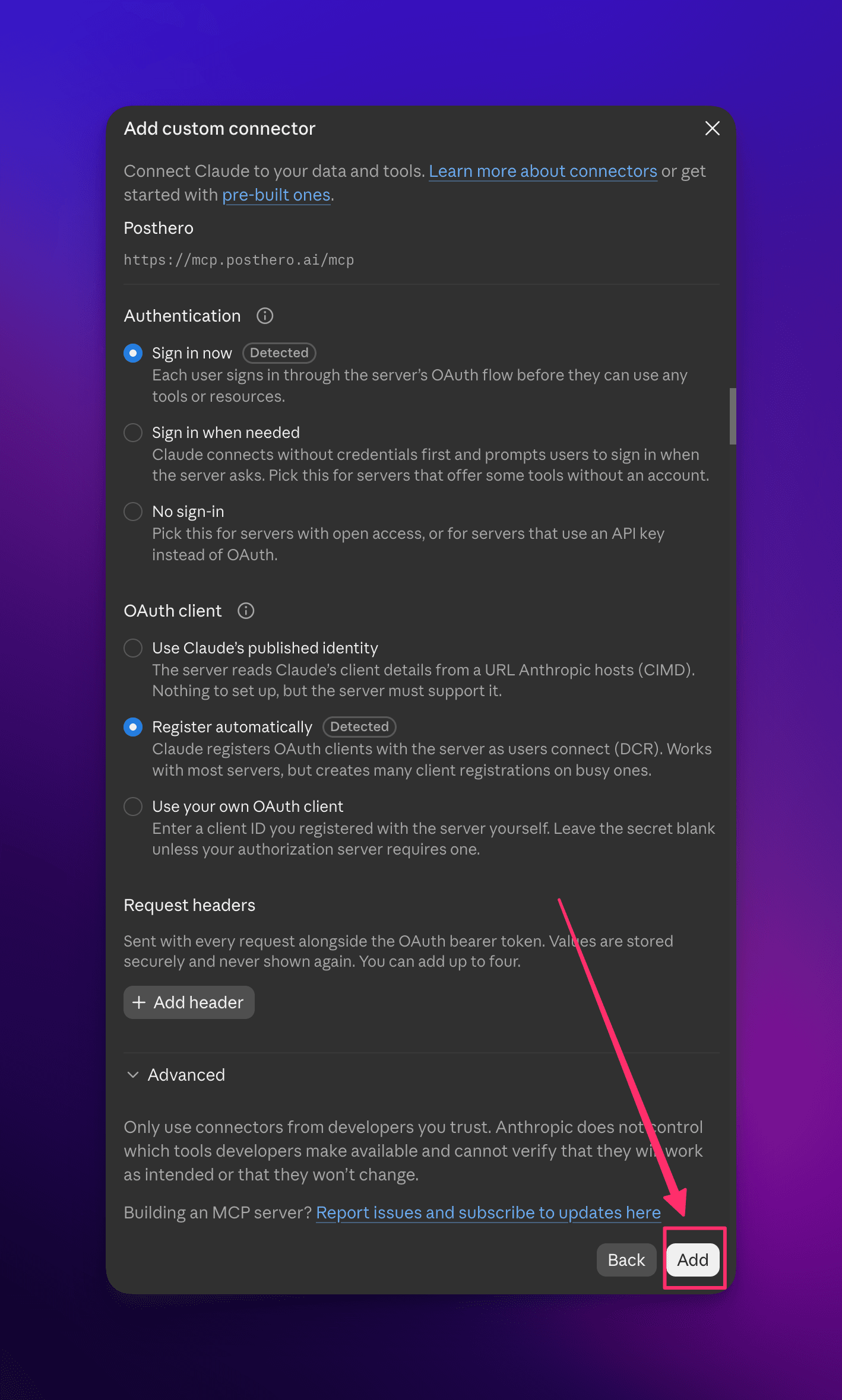
Then keep the defaults (“Sign in now”, “Register automatically”) and click Add.
Step 3: Sign in and allow access
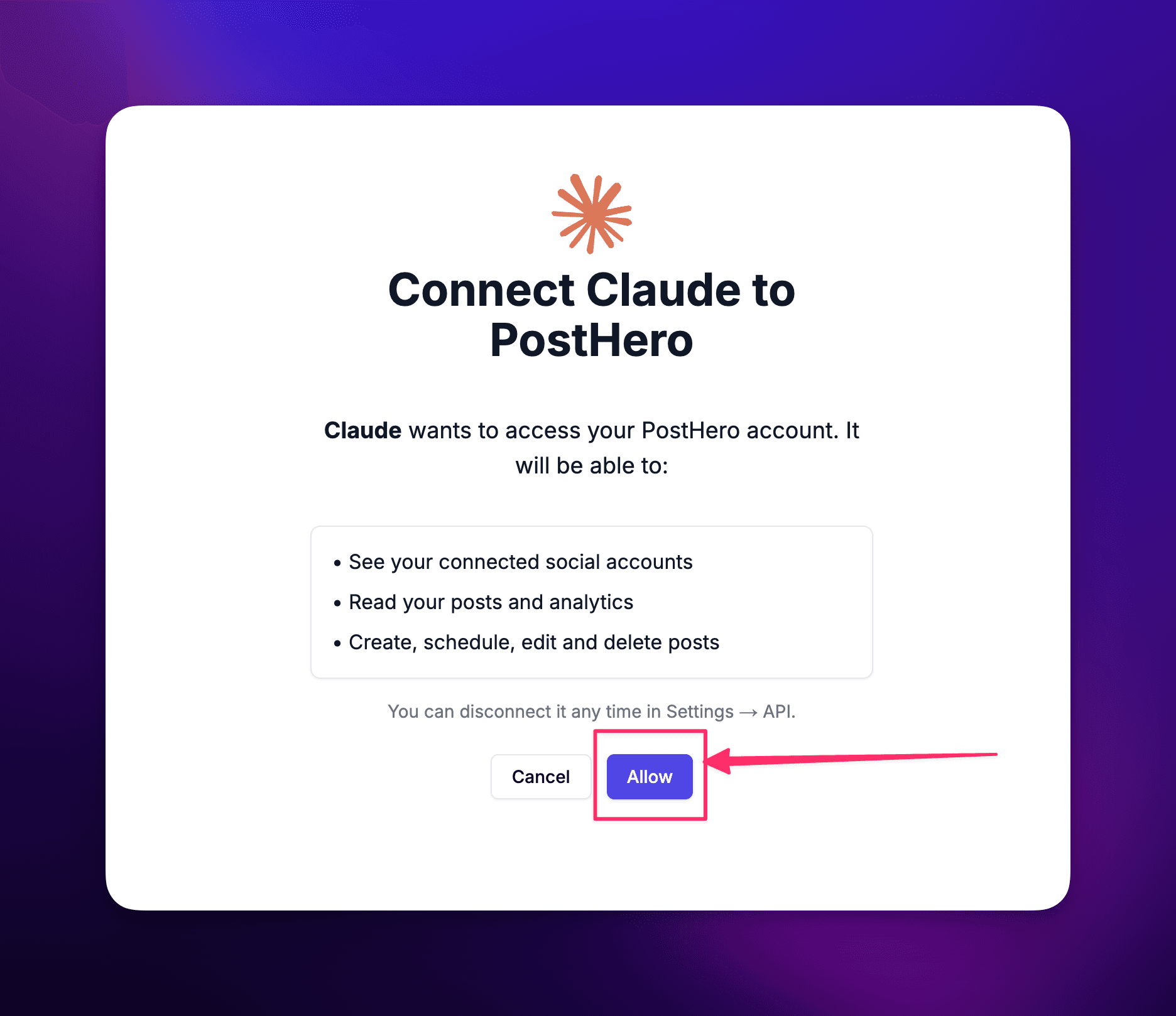
Sign in to PostHero with the same account you used in step 1 and click Allow.
Hide screenshotShow screenshot
Step 4: Turn it on and test it
In a new chat, turn PostHero on under + > Connectors and ask:
List my connected accounts
What you need for LinkedIn specifically
- Your personal profile, a company page, or both. PostHero connects both. Each one shows up in Claude as its own account, so you can say “post this on my profile” or “put this on the company page” and Claude knows which is which.
- The official LinkedIn login. You connect LinkedIn on LinkedIn’s own sign-in screen inside PostHero. Claude never sees your password, and nothing logs in with your browser cookies.
- No developer app. PostHero holds the connection to LinkedIn’s API, so you skip registering an app and asking LinkedIn for permissions.
- Any Claude plan. The Free plan allows one custom connector, which is all this needs.
If you post on other platforms too, the same connector covers them. Here’s how to connect Claude to all your social media.
Can Claude post to LinkedIn?
Yes, with a connector. On its own, Claude can only write a LinkedIn post as text for you to copy and paste. With PostHero connected, it saves the post as a draft on your profile or company page, schedules it when you give a time, publishes only after you confirm, and reads back how it performed.
Here’s what Claude can do on LinkedIn through PostHero:
- Text posts up to 3,000 characters.
- Images or video: up to 20 images in a post, or one video with a title. They need to be public links, so upload your files to your PostHero media library first and tell Claude to use them.
- Carousels (PDF document posts). Claude designs the slides, PostHero renders them and saves a LinkedIn document draft. You see the slide plan first and every slide before anything is saved. Already have a PDF? Claude can attach it with a title.
- A first comment. Put your link in a comment that PostHero adds 30 seconds after the post goes live, instead of in the post itself.
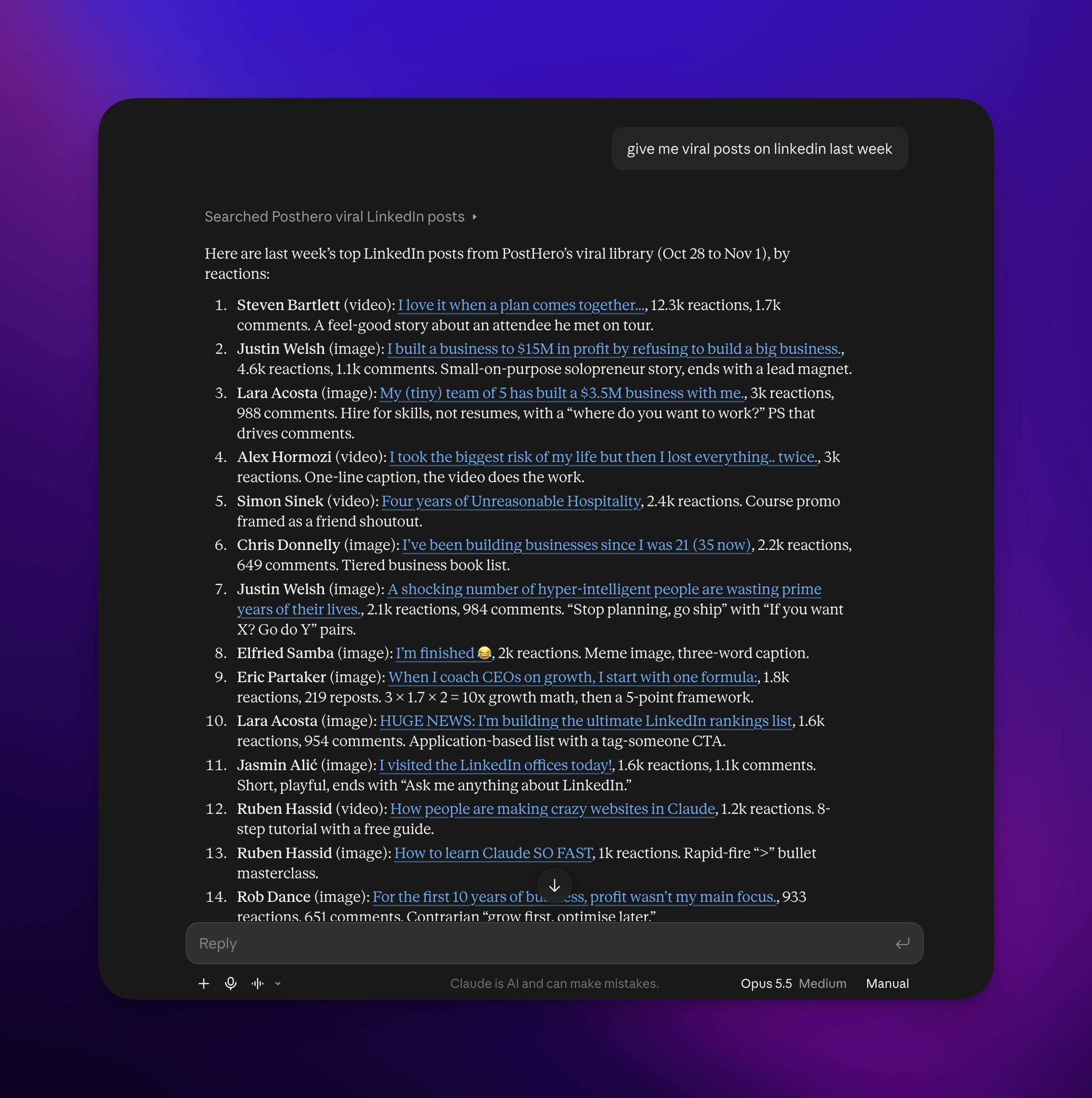
- Viral post library. Claude can search real LinkedIn posts that took off, with the full text, hook, reactions, comments and creator, and read how they were built before writing yours.
- Scheduling for any date and time you give it.
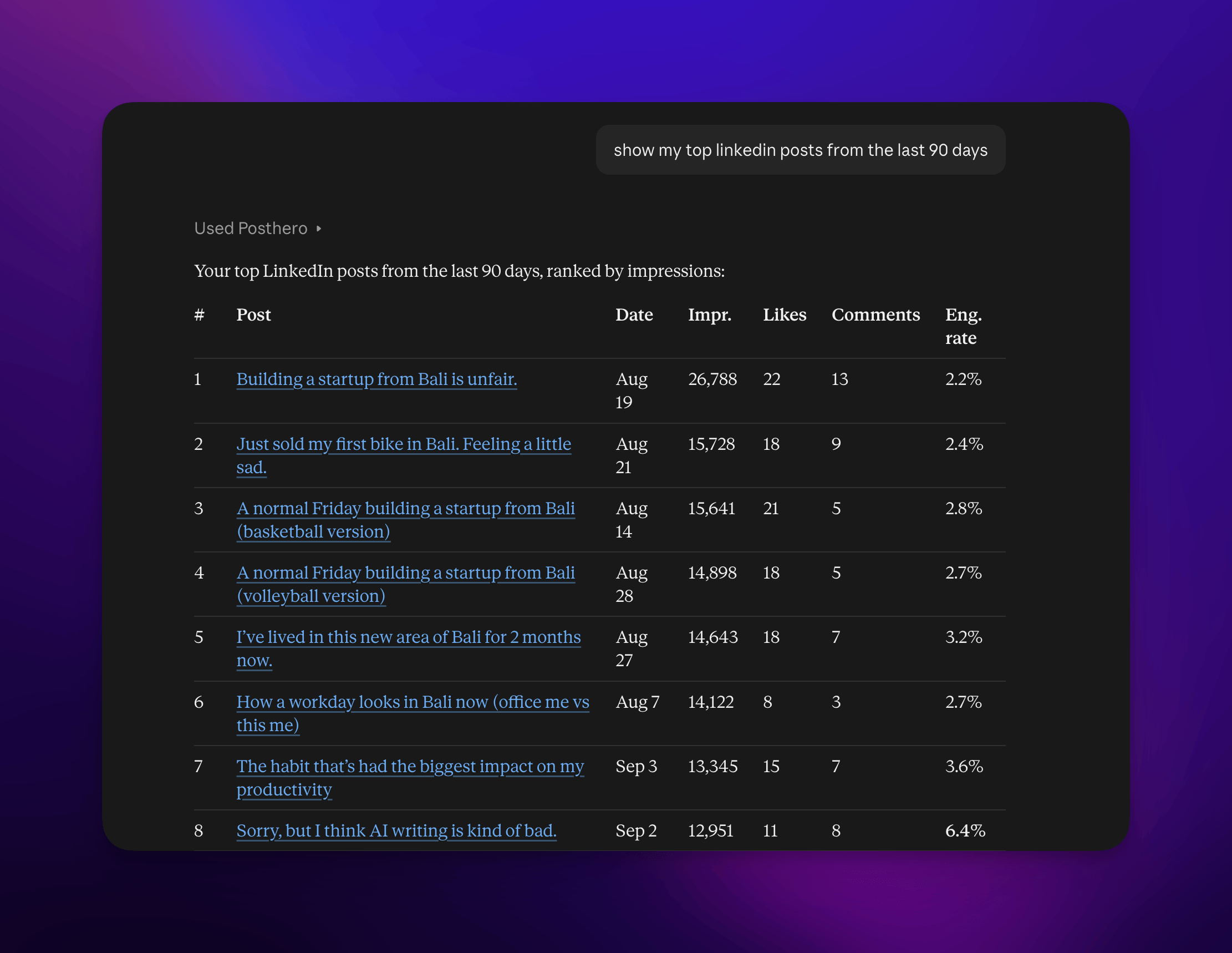
- Analytics for your own accounts, personal profile included: impressions, likes, comments and shares for a period, plus your top posts ranked by the metric you pick.
- Own text per account when one idea goes to your profile and a company page.
How I use Claude for LinkedIn
A lot of it is the same as on any platform. I give Claude a rough idea and ask for a post, or I paste what I wrote and ask it to check my language. And when I don’t know what to post, I ask Claude, because it already knows my week from the tools it’s connected to and our past chats. It’ll suggest something like the problem with a client I mentioned after a call. That’s my idea bank.
LinkedIn adds one thing I don’t do anywhere else: I start from posts that already worked.
On LinkedIn, the first two lines decide whether anyone clicks “see more”, and a hook that already stopped thousands of people is a better starting point than a blank page. So before I write, I look at what’s working, either in PostHero’s viral post library or from creators I follow.
Here’s a real one. Last week I found a viral post from a creator I like. The hook was built like this:
I turn [AGE] today.
[NUMBER] days ago, I moved to [PLACE].
No friends. No experience. Just [RECENT TRANSITION].
Three short lines: a personal milestone, a specific number, and a blunt “here’s how little I had” line. It reads like a story is about to start, so you keep going.
I gave Claude that post and asked it to use it as inspiration, but to write the post for my case and my niche, with my own examples. It kept the shape of the hook and filled it with my story. That post was my best performing LinkedIn post that month.
The rule I took from it: borrow the structure, never the words. The hook pattern is what you’re learning from. The story has to be yours, or it’s just a worse copy of someone else’s post.
What goes wrong (and what I tell Claude instead)
- General AI slop. “Write a LinkedIn post about leadership” gets you the post everyone has already scrolled past a hundred times. Give Claude something real: a client conversation, a number, a decision you made and why.
- Reposting another platform’s content. A tweet stretched into a LinkedIn post, or a blog intro pasted in, rarely lands. LinkedIn wants a short story with room to breathe.
- Too polished, too expert. The “7 lessons from 10 years of leadership” voice is exactly what makes AI posts easy to spot. The posts that do well read like a person talking, not a consultant presenting.
- Copying the viral post itself. If you hand Claude a viral post and just say “write one like this”, you’ll get the same story with new nouns. Tell it what’s yours.
So my standing instruction is short: write it like a person on LinkedIn, not a brand, and don’t pitch anything.
Write this for LinkedIn in a natural, personal style, like I’m telling the story to a colleague. Short lines, plain text, no markdown, no hashtags, no pitch or call to action. Keep my words where they sound like me. Show me the draft before saving it.
Claude LinkedIn rules worth knowing
Use the API, not your browser session. Some LinkedIn tools for Claude, especially free ones on GitHub, work by driving your logged-in browser session to read profiles and your feed. LinkedIn’s User Agreement rules out bots and scraping, and that’s the kind of access that gets accounts restricted. PostHero posts through LinkedIn’s official API with the permission you gave on LinkedIn’s own login screen.
Plain text only. LinkedIn doesn’t render markdown. If Claude writes **bold**, your post shows the asterisks. Ask for plain text (the instruction above does).
Links go in the first comment. Posts with links in the body tend to reach fewer people on LinkedIn, so I put links in the first comment. Ask Claude to do the same:
Save this as a LinkedIn draft on my profile. Keep the link out of the post and add it as the first comment instead: [link]
Keep a human in the loop. Everything Claude makes in PostHero starts as a draft. It schedules only when you give it a time, and it publishes right away only when you ask and confirm once more. That’s deliberate: your LinkedIn profile is your professional reputation, and an AI posting to it without asking is a risk nobody needs.
Claude LinkedIn connectors, compared
LinkedIn has no official connector inside Claude, so every option is third-party. Most can publish a post. The differences are in what else they do and how they connect.
| Option | Platforms | Stands out for | Good to know |
|---|---|---|---|
| PostHero | 8 | Viral LinkedIn post library, carousels Claude designs, first comment | ✅ Profile analytics, ✅ draft first |
| PostFast | 11 | PDF document posts from your own file | ❌ No first comment, ❌ no profile analytics |
| Taplio | A LinkedIn-only toolkit | Publishing needs your confirmation | |
| LiGo | Reading your own post metrics | Needs a paid LiGo plan | |
| ContentIn | Writing trained on your past posts | Shows the exact text before publishing | |
| Open-source servers (GitHub) | Free, reads profiles, jobs and feed | ❌ Uses your session cookie: account risk |
Based on each vendor’s own pages, checked 4 November 2026.
The honest version:
- Pick Taplio, LiGo or ContentIn if LinkedIn is your only platform and you want a tool built around it.
- Pick PostFast if you mostly schedule company page posts and make your PDFs elsewhere.
- Skip the open-source servers for the account you make a living from. Free isn’t worth a restricted profile.
- Pick PostHero if you want Claude to learn from what’s going viral on LinkedIn, write in your own story, design the carousel, and handle your other platforms from the same chat. That’s the job I built it for.
Copy-paste prompts for LinkedIn
Swap the bits in brackets for your own.
Find hooks that are working right now
Search the viral LinkedIn post library for [topic] from the last 30 days, sorted by viral ratio so small creators with big hits show up. Show me the 5 best hooks with links to the posts and what makes each one work. Don’t write anything yet.
Borrow the structure, write your story
Use this post as inspiration for the hook and structure only: [post or link]. Write my own version for my niche ([niche]) using my examples: [what happened to me]. Don’t reuse any of its wording. Plain text, short lines, no pitch. Show me the draft before saving.
Get ideas from your own week
Based on what we’ve talked about this week, give me 5 LinkedIn post ideas. Each one should come from something that actually happened to me, with a first line that would make someone stop scrolling. One idea per line.
Turn a post into a carousel
Turn this post into a LinkedIn carousel of 6-8 slides: a hook slide, one point per slide, and a closing question. Show me the slide plan first. Once I approve, design it and save it as a LinkedIn document draft on my profile: [post]
Profile and company page
Post this idea on my LinkedIn profile and on the [company] page, with its own text for each: first person and personal for my profile, shorter and factual for the page. Save both as drafts.
Schedule and review
Schedule the LinkedIn drafts we made today: one on [day] at [time], the other on [day] at [time], in my time zone. Check what’s already scheduled first so nothing clashes.
Show me my top 5 LinkedIn posts from the last 90 days by impressions. What do their first two lines have in common, and what should I write more of?
Using ChatGPT instead?
You can use the same connector in ChatGPT. PostHero works over MCP, the connector standard both assistants support, so you add https://mcp.posthero.ai/mcp as a custom connector in ChatGPT and sign in with the same PostHero account. ChatGPT then sees the same LinkedIn profile and pages, the same viral library and the same drafts. The prompts above work as they are, and the plain-text instruction matters even more there, because ChatGPT loves markdown. Why I built PostHero to work with any AI agent is in PostHero goes agentic.
Why isn’t Claude posting to LinkedIn?
- The connector is off in this chat. Connectors are switched on per conversation. Click +, open Connectors and turn PostHero on.
- Claude finds no LinkedIn account or page. Check that the profile or page is connected in PostHero, and that the connector is signed in to that same PostHero account.
- The draft saved but won’t publish. Usually the text is over 3,000 characters. Ask Claude to shorten it; it sees the same warning.
- Asterisks or # signs in the post. Claude used markdown. Ask it to rewrite in plain text.
- Your image won’t attach. Claude can’t pass files from the chat to PostHero. Upload the image to your PostHero media library and ask Claude to use it from there.
FAQ
Can Claude post to LinkedIn on its own?
No. Claude has no built-in connection to LinkedIn. It can write posts as text, but to save, schedule or publish them it needs a connector like PostHero.
Can Claude post to a LinkedIn company page?
Yes. Connect the page in PostHero next to your profile, and tell Claude which one to use. One idea can go to both, each with its own text.
Can Claude make LinkedIn carousels?
Yes. Claude designs the slides, PostHero renders them and saves a PDF document draft for LinkedIn. You approve the slide plan and see the slides before anything is saved.
Can Claude find viral LinkedIn posts for inspiration?
Yes, through PostHero’s viral post library. Claude searches it by topic, reads the posts and their numbers, and adapts the structure to your story. Ask it not to reuse the original wording.
Will Claude post to LinkedIn without asking me?
No. Everything starts as a draft. Publishing needs your explicit go-ahead plus one confirmation.
Is it free to connect Claude to LinkedIn?
On the Claude side, yes: the Free plan supports one custom connector. PostHero has a 7-day free trial, so you can test the whole workflow before paying.
Does it work with my other platforms too?
Yes. The same connector covers X, Threads, Instagram, Facebook, YouTube, TikTok and Bluesky. See the guide to connecting Claude to social media, the Instagram guide for reels, and the X guide for threads.
PostHero for Claude
Run your LinkedIn from Claude
Connect in 2 minutes. Learn from posts that are already working, write your own story, and approve every post before it goes out.
7-day free trial. Everything starts as a draft.