ChatGPT for TikTok: Prompts + How to Connect It

Out of the box, a ChatGPT TikTok workflow is all copy and paste. ChatGPT writes the hook and the script, and you carry them off to build the video somewhere else. Connect ChatGPT to TikTok and that changes: it can design the video, save it as a TikTok draft and read your numbers back to you. The setup takes about 2 minutes, and you don’t need a TikTok developer account.
I’m Anton, founder of PostHero. I built the connector that lets AI assistants post to TikTok, and making short videos inside a chat is the part of it I’ve spent the most time on. This guide starts with the setup, then covers what ChatGPT can and can’t do on TikTok, how a video gets from the chat to your drafts, TikTok’s own rules for apps that post for you, and how the options compare. If you only came for prompts, the ChatGPT prompts for TikTok hooks, scripts and captions are further down, and they work without connecting anything.

 Setup · 2 minutes
How to connect ChatGPT to TikTok
One connector for 8 platforms. Set it up once, and ChatGPT can work on your TikTok from any chat.
- Videos and photo posts
- Send to TikTok drafts
- Scheduling
- Analytics
Step 1: Connect your TikTok account
Create a PostHero account and connect your TikTok account. TikTok asks you to approve access on its own screen, so ChatGPT never sees your password.
Hide screenshotShow screenshot

Step 2: Add PostHero as a custom MCP server
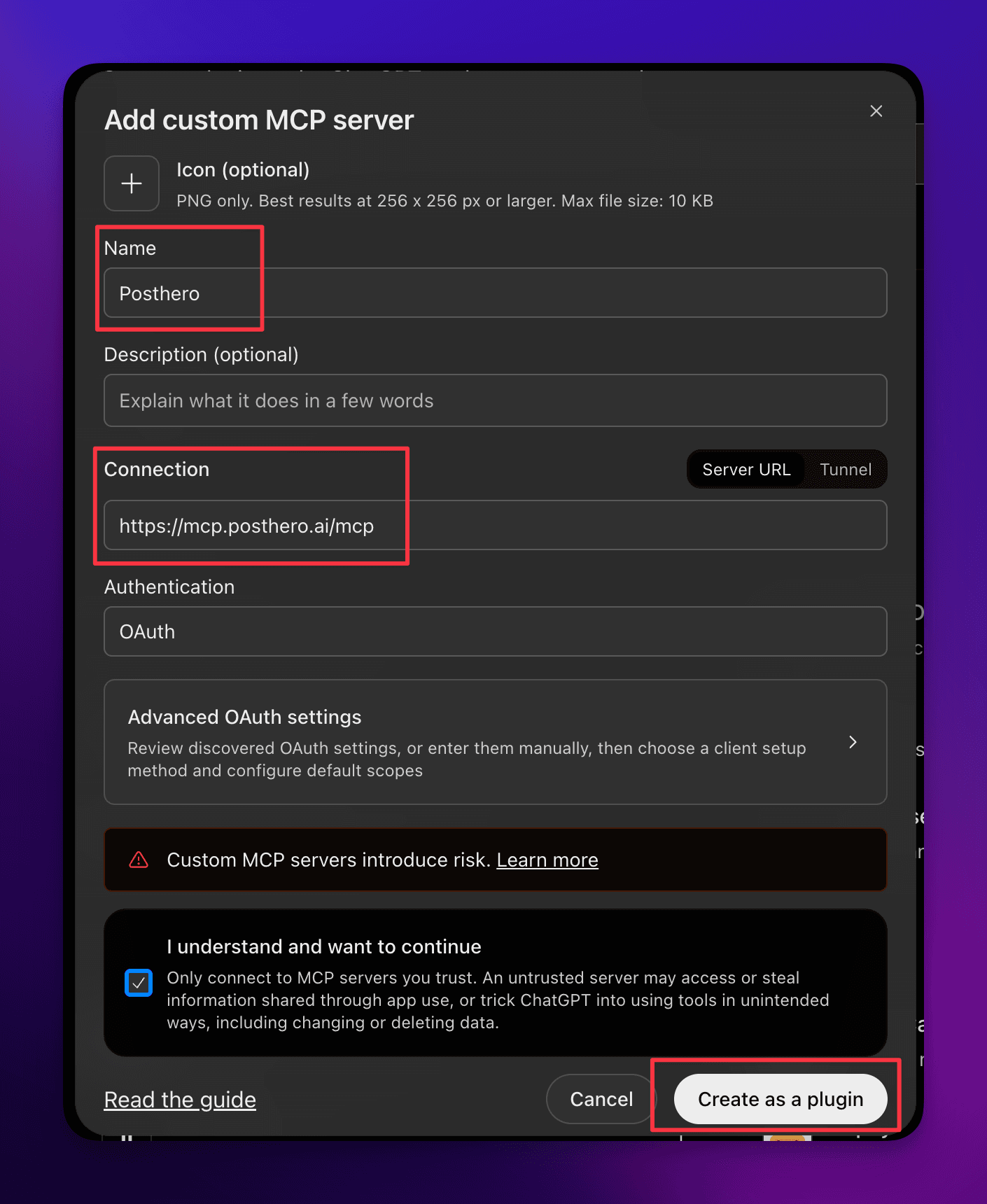
Open Plugins, click +, then Add custom MCP server. Name it PostHero, paste the URL, choose OAuth and click Create.
Hide screenshotShow screenshot
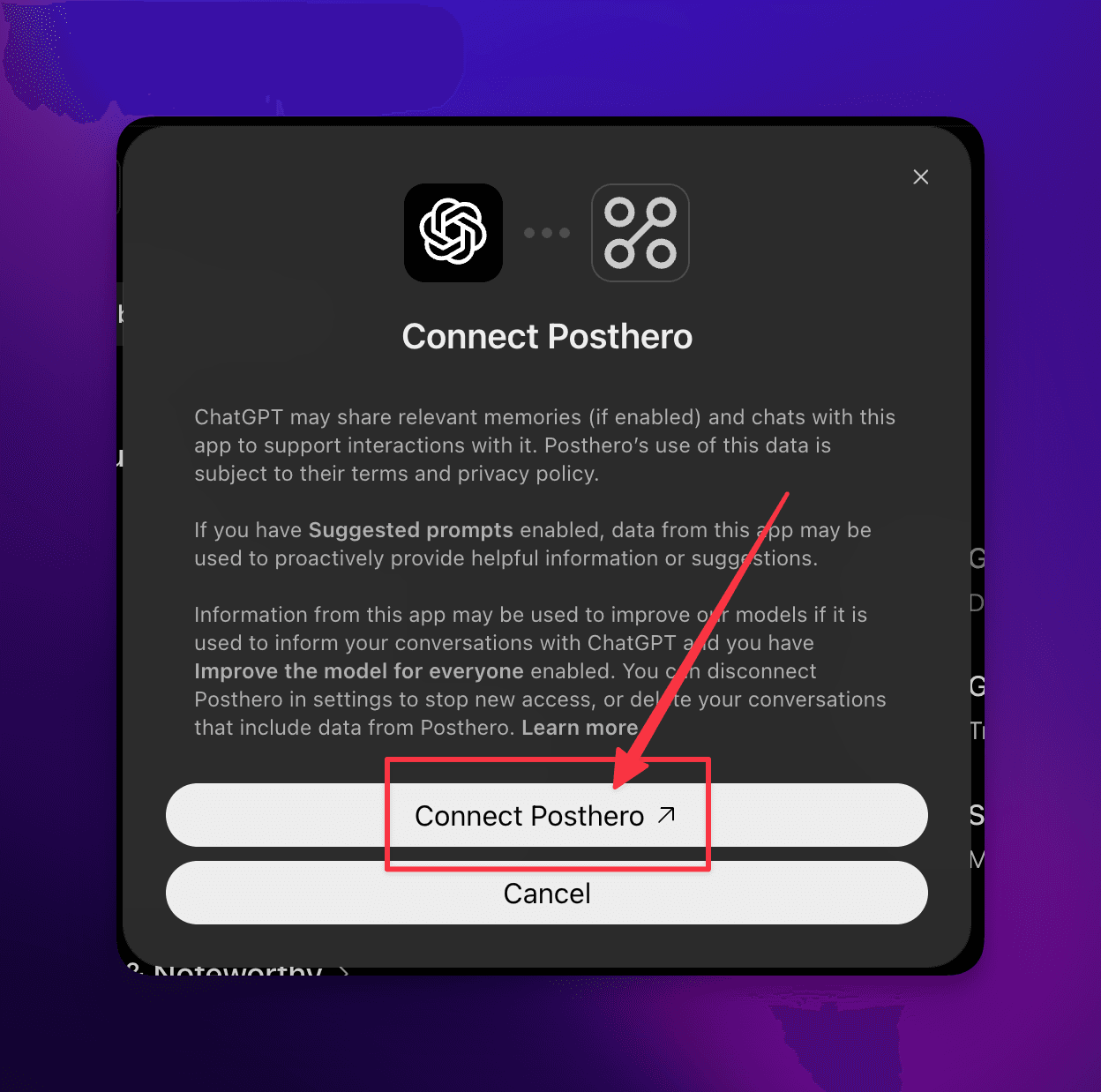
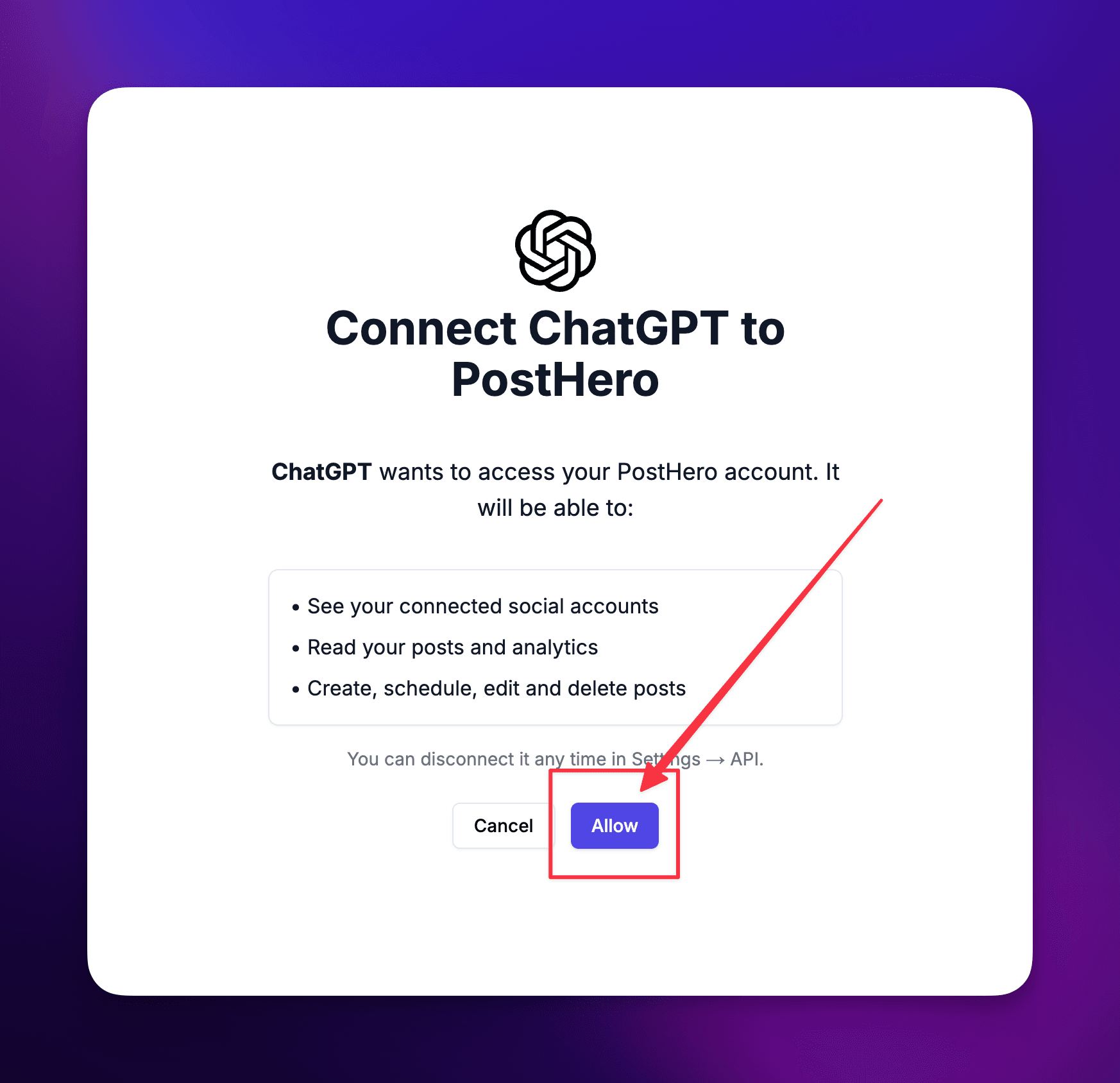
Step 3: Sign in and allow access
Sign in to PostHero with the same account you used in step 1 and click Allow.
Hide screenshotsShow 2 screenshots
Step 4: Turn it on and test it
Click New chat, pick PostHero and ask:
List my connected accounts
What you need before you start
- A TikTok account. You link it to PostHero on TikTok’s own authorization screen, so neither ChatGPT nor PostHero sees your TikTok password.
- No TikTok developer app. PostHero’s TikTok app is verified by TikTok. That matters more than it sounds, because posts sent through unverified apps only go out as private. More on that in the rules section.
- A ChatGPT plan that lets you add custom MCP servers. OpenAI decides which plans get this and has changed it more than once this year. If Plugins doesn’t show “Add custom MCP server” for you, your plan or workspace doesn’t allow it yet. On Business, Enterprise and Edu workspaces, an admin may need to add it or switch it on.
- The same PostHero account in both places. Sign in to the connector with the account where you linked TikTok. Otherwise ChatGPT connects happily and then finds no TikTok account.
- chatgpt.com for the setup. Add the connector in ChatGPT on the web.
- A video or images for every post. TikTok has no text-only posts through its API. ChatGPT can make the video for you, or you can upload your own file to your PostHero media library and tell ChatGPT to use it.
Several TikTok accounts? Connect each one and tell ChatGPT which to use. The same connector also covers LinkedIn, X, Threads, Instagram, Facebook, YouTube and Bluesky. I’ve written the ChatGPT versions for two of them so far: ChatGPT for Instagram and ChatGPT for X. The guide to connecting AI to all 8 social platforms shows what works on each one, and why I built PostHero for any AI assistant instead of just one is in PostHero goes agentic.
Can ChatGPT post to TikTok?
Not on its own. ChatGPT can write a hook, a script or a caption, but it has no access to your TikTok account. With a connector like PostHero, ChatGPT can design a short vertical video, save it as a TikTok draft, schedule it, send it to your TikTok inbox, or publish it after you confirm.
What ChatGPT can do on TikTok through PostHero:
- Make a short vertical video in the chat. ChatGPT designs every scene, PostHero renders the video, and it lands in your media library ready to post.
- Video posts with captions up to 2,200 characters.
- Photo posts of up to 35 images, with TikTok’s auto-added music if you want it.
- Choose who sees it: everyone, followers, mutual friends, or only you.
- Comments, Duet and Stitch switched on or off for each post.
- Inbox drafts. Instead of posting, ChatGPT sends the video to the inbox in your TikTok app, so you can add a sound or tweak it there before it goes live.
- Scheduling for any date and time you give it.
- TikTok analytics: views, likes, comments, shares and followers for a period, plus your top posts ranked by the metric you pick.
Everything lands in PostHero as a draft first. ChatGPT schedules only when you give it a time, and publishes right away only when you ask and confirm once more. I built it that way on purpose. An assistant that posts a half-finished video on its own is the fastest way to stop trusting it.
What it can’t do yet: read or reply to TikTok comments, search viral TikToks, or track TikTok competitors. The viral library and competitor tracking work on Instagram for now, which is what the ChatGPT Instagram guide is mostly about. And it’s organic posts only, so no TikTok Ads.
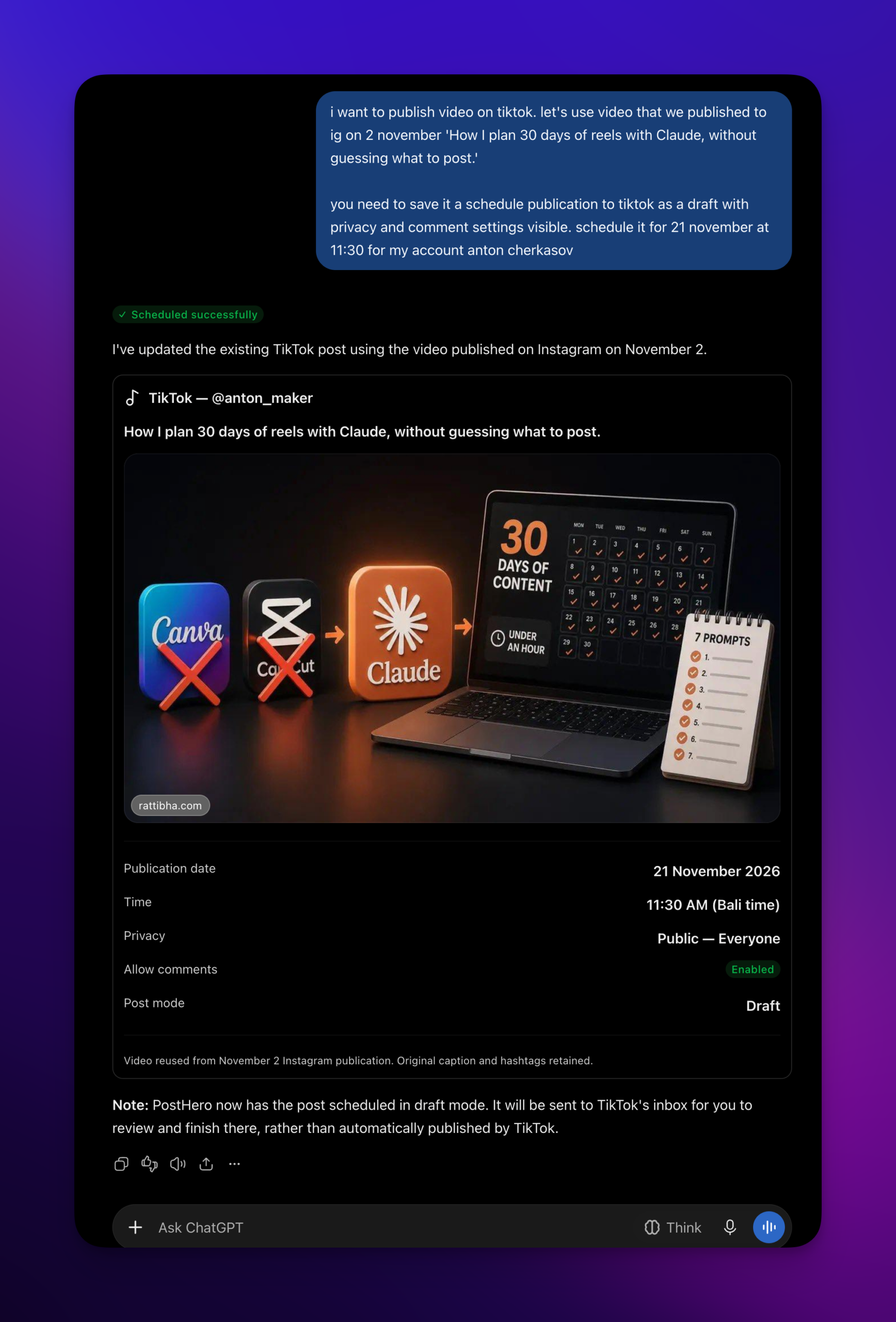
From a ChatGPT-made video to TikTok
Almost every other option in the comparison further down assumes your video already exists. Here it comes out of the same chat, in three steps.
- ChatGPT designs the video. You describe the idea. ChatGPT writes a storyboard scene by scene and shows it to you. Before anything renders you can add background music, a voiceover and sound effects, and you can use your own clips from your media library as scenes.
- PostHero renders it. About a minute later there’s a short vertical video in your media library. PostHero doesn’t design anything. It renders what ChatGPT designed and you approved. Most tools do the design inside their own editor, and here the chat is the editor.
- ChatGPT saves it for TikTok. The file becomes a TikTok draft with a caption written for TikTok, not pasted from another platform.
A short vertical video is a short vertical video, so the same file can also go out as an Instagram reel and a YouTube Short from the same chat, each with its own caption, and a title for the Short. If you want the detail on what goes into these videos, it’s in the Instagram reels guide.
Talking-head videos work differently, because ChatGPT can’t film you. For those it writes the filming script instead (the hook, the beats, the on-screen text, B-roll ideas) and attaches it to the draft. It’s waiting there when you pick up the phone.
What I learned making videos in a chat
My first AI-made videos were bad. Not broken, just forgettable. I was typing “make a video about social media scheduling” and getting the average video on that topic.
The biggest jump came from borrowing structure. On Instagram, working in Claude through this same connector, I had a competitor’s viral reel broken down scene by scene and built my own on that skeleton. It got 719 views against my usual 64, about 11 times more. That’s an Instagram number from a Claude chat, so take it as evidence for the method and nothing else. The method carries over, though: describe a TikTok that did well in your niche, or paste its transcript, and ask ChatGPT for the same breakdown before it designs yours.
Two more things I’d tell anyone starting:
- Basic prompts give basic videos. “Make a TikTok about my niche” is where most bad results come from. Give ChatGPT a specific idea, a structure that already works, or something that really happened to you.
- Expect a few attempts. Good videos take several rounds. That’s a skill you’re building. It doesn’t mean the tool is broken.
And one instruction I give every time, because it fixes the ad voice before it starts:
For anything going to TikTok: write it casual and native, like a creator talking, not a brand. Don’t pitch anything. Keep on-screen text short enough to read in one second. Show me everything before you save it.
TikTok rules worth knowing
TikTok publishes content sharing guidelines for apps that post on your behalf. A handful of them change how you should run this from ChatGPT.
Unverified apps can only post privately. Until an app passes TikTok’s audit, everything it posts is restricted to private viewing. DIY and self-hosted setups run into this, and people usually find out when a video gets zero views. PostHero’s app has passed the audit, so the privacy setting you choose is the one TikTok applies.
It has to be your own content. TikTok wants these apps used by creators posting original work, and it rules out copying arbitrary content over from other platforms. A video you made with ChatGPT is yours. Somebody else’s viral video isn’t. When you reuse your own reel, post the clean file from your media library instead of a download with another app’s watermark on it.
You see it and agree before it uploads. TikTok expects a preview and your clear consent before anything is sent. PostHero already works that way: draft first, then your go-ahead, then one more confirmation to publish.
Promoting a brand? Finish in the app. TikTok asks you to disclose content that promotes a brand, product or service. For those videos, have ChatGPT send the file to your TikTok inbox and set the disclosure in the TikTok app before you post.
There’s a daily cap. TikTok limits how many posts one creator can make through apps in a day, typically around 15, shared across every app you use. That’s plenty for a person. It does mean you can’t dump a month of backlog in one afternoon.
One practical note: a new post can take a few minutes to process before it shows on your profile.
Ways to use ChatGPT with TikTok, compared
There’s no official TikTok plugin in ChatGPT, so every option is a third party. Most of them do one job: report your numbers, or publish a video you already made.
| Option | Makes the video | Posts to TikTok | Reads your stats | Where it runs |
|---|---|---|---|---|
| PostHero | ✅ ChatGPT designs, PostHero renders | ✅ Draft first, schedule or inbox | ✅ Yes | In the chat |
| Composio | ❌ Bring your own | ✅ Yes, video from a public link | Profile stats and video list | In the chat |
| Windsor.ai | ❌ No | ❌ Read-only | ✅ Yes | In the chat |
| Minter.io | ❌ No | ❌ Read-only | ✅ Yes | In the chat |
| IFTTT | ❌ No | Inbox draft only | ❌ Not listed | Background applets |
| TokGPT extension | ❌ No | ❌ No | ❌ No, it summarizes videos you watch | Chrome, on TikTok’s site |
| ChatGPT on its own | Scripts and captions only | ❌ No | Only what you paste | In the chat |
Based on each vendor’s own pages, checked 18 November 2026.
My honest take:
- Windsor.ai or Minter.io if all you want is ChatGPT answering questions about your TikTok numbers. Both are read-only, and both go deeper on reporting than PostHero does.
- Composio if your videos are already edited and hosted somewhere, and you’re comfortable with a developer-style toolkit.
- IFTTT if you want an automation running in the background instead of a chat, like caption ideas each time you post a new video.
- TokGPT if you want transcripts and summaries of other people’s TikToks. Its store page says it was last updated in April 2023, so check it still works for you.
- PostHero if you don’t have the video yet and want ChatGPT to make it, then post it to TikTok and your other platforms from the same chat. That’s the gap I built it for.
ChatGPT prompts for TikTok: hooks, scripts and captions
These work in any ChatGPT chat, connected or not. Ask for “a TikTok script about fitness” and you get the average fitness script. It reads fine. Nobody watches past second two.
The fix is boring: tell it who you are before you ask for anything. One message at the start of the chat does more for the results than any clever wording later.
I make TikTok videos about [niche] for [who watches]. I talk like this: [3 words]. Here’s a video of mine that did well: [the hook and what happens in it]. Here’s one that flopped: [the hook and what happens in it]. Keep all of this in mind for everything I ask in this chat.
Then ask for one thing at a time. Swap the parts in brackets for your own.
Hooks
The hook is most of the job on TikTok, so ask for more than you need and throw most of them away.
Give me 10 opening lines for a TikTok about [topic]. Each one has to work as on-screen text in the first 2 seconds with the sound off. Maximum 8 words. Statements only, no questions.
I’m choosing between these hooks: [paste 3]. Tell me which one you’d scroll past and why. Then rewrite the weakest so it names one specific thing instead of a general idea.
ChatGPT TikTok script prompts
A TikTok script is closer to a storyboard than to an essay. Ask for scenes, and keep the words on screen short enough to read in a second.
Write a 20-second TikTok script about [topic], built on this hook: [hook]. Split it into scenes. For each scene give me the on-screen text in under 8 words and what’s shown behind it. One idea per scene. End on a line worth saving, not a pitch.
If you film yourself, ask for something you can say out loud:
I’m filming this one myself. Write a 30-second script about [topic] the way I’d say it to a friend: the hook line, then 3 beats with what I say and the text on screen, plus a B-roll idea for each beat. No intro, no “hey guys”.
Captions
Left alone, ChatGPT writes captions that read like ads. Say what you don’t want.
Write 3 captions for a TikTok about [topic]. One line each, casual, like a creator talking. No pitch, no “link in bio”, no corporate words. Add up to 3 hashtags someone would actually search for.
Ideas from your own week
If I could keep one prompt, it’d be this one. The best ideas I get out of an AI come from things that happened to me that week, like a struggle with a client on a recent call. That’s more TikTok-shaped than any “top 10 tips” list. ChatGPT only knows your week if you tell it, so paste your notes in, however rough.
Here’s what happened in my work this week: [paste notes, wins, annoying moments]. Give me 5 TikTok ideas. Each one must come from a real moment in that list, with a hook I could show in the first 2 seconds. One line each.
Here’s a post I wrote for another platform: [paste]. Don’t shorten it. Find the one moment in it that would work as a TikTok and outline just that moment as 4 scenes.
That second prompt exists because of a mistake I see all the time. A LinkedIn post chopped into on-screen text is still a LinkedIn post. It’s too polished and too expert for TikTok, where people scroll past anything that looks like an ad.
ChatGPT TikTok prompts for posting and analytics
These only work with PostHero connected, because they ask ChatGPT to make real videos and save real drafts.
Make the video
Design a 20-second vertical video for TikTok about [idea]. Show me the storyboard scene by scene first, with the on-screen text for each scene. Suggest background music and where a sound effect would help. Render it with PostHero only after I say yes.
Use my latest clip from my PostHero media library as one of the scenes and build the rest of the video around it. Show me the storyboard before you render anything.
This TikTok did well in my niche: [describe it or paste the transcript]. Break down why it works, scene by scene. Then design my own video about [my topic] on the same structure, in my words.
Post it
Save the video we just made as a TikTok draft for @[handle]. Short casual caption, up to 3 hashtags, visible to everyone, comments on, Duet and Stitch off. Show me the caption before you save it.
Don’t post this one. Send it to my TikTok inbox so I can add a sound in the TikTok app first.
Use the same video for TikTok, an Instagram reel and a YouTube Short. Write a separate caption for each platform and a title for the Short. Save all three as drafts.
Schedule the TikTok draft for [day] at [time] my time. Don’t publish anything else.
Photo posts
Design a 6-slide vertical carousel about [topic] and show me the slide plan first. When it’s rendered, save the slides as a TikTok photo post draft with auto-added music.
Analytics
Show my TikTok views, likes, comments, shares and follower change for the last 30 days. Then rank my top 5 posts by views and tell me what the best ones have in common.
Based on my top TikTok posts this month, suggest my next 3 videos. For each one, tell me which past video it builds on and what the hook would be.
Using Claude instead?
Same connector, same tools, same drafts. The one difference I’ve noticed is the storyboard: ChatGPT renders it a bit differently from Claude. I can’t tell you which is better, and I don’t think there’s a right answer. It comes down to which assistant you like working in. If that’s Claude, the setup and screenshots are in my Claude TikTok guide.
ChatGPT isn’t posting to TikTok: quick fixes
- The connector isn’t on in this chat. Pick PostHero from the + menu in a new chat, or mention PostHero by name in your message.
- There’s no “Add custom MCP server” option. Your plan or workspace doesn’t allow custom servers. On a work workspace, ask your admin.
- ChatGPT finds no TikTok account. You’re probably signed in to a different PostHero account than the one with TikTok linked. Disconnect, then sign in with the right one.
- The draft saved but won’t publish. TikTok posts need a video or images. A caption on its own won’t go out. ChatGPT sees the same warning and can fix the draft.
- Your own video won’t attach. ChatGPT can’t pass files from the chat to PostHero. Upload the video to your PostHero media library first, then ask ChatGPT to use it.
- It posted but isn’t on your profile. TikTok can take a few minutes to process a new post. Check again shortly.
FAQ
Can ChatGPT post to TikTok?
Not on its own. With a connector like PostHero, ChatGPT saves TikTok posts as drafts, schedules them, sends them to your TikTok inbox, or publishes them once you ask and confirm.
Can ChatGPT make TikTok videos?
Plain ChatGPT writes the script. With PostHero connected, it designs a short vertical video scene by scene and PostHero renders it, with optional music, voiceover and sound effects. For videos you film yourself, it writes the filming script and attaches it to the draft.
Is ChatGPT good at TikTok scripts?
Yes, when you give it context: your niche, who watches, and one video of yours that worked. Ask for scenes with short on-screen text instead of paragraphs, and tell it not to pitch.
Can ChatGPT see my TikTok analytics?
Only through a connector. Without one, it knows the numbers you paste in and nothing more.
Will ChatGPT post to TikTok without asking me?
Not with PostHero. Everything starts as a draft, and publishing needs your go-ahead plus one confirmation. You can also send a video to your TikTok inbox and finish it in the app.
Is it safe to connect ChatGPT to TikTok?
Yes, with a connector that uses TikTok’s official login. You approve access on TikTok’s own screen, so your password stays with TikTok. ChatGPT shows a warning when you add a custom MCP server, because OpenAI doesn’t review them, so only add servers from companies you trust.
Can ChatGPT run TikTok ads?
Not through PostHero, which covers organic posts only.
Does it work with my other platforms?
Yes. The same connector covers LinkedIn, X, Threads, Instagram, Facebook, YouTube and Bluesky, so one video can go to TikTok, Instagram and YouTube from a single chat.
PostHero for ChatGPT
Make your next TikTok in ChatGPT
Connect in 2 minutes. ChatGPT designs the video, PostHero renders it, and nothing goes live until you approve it.
7-day free trial. Everything starts as a draft.