Claude Writing Style: How to Make Claude Write Like You

If you want to set a Claude writing style in 2026, don’t start with the Styles menu. Anthropic is turning custom styles into skills and removing most of the presets. Your voice rules now go in a skill, in a Project’s instructions or in your account-wide instructions, and a short set of rules works better than a long one.
I’m Anton, founder of PostHero. I write my own posts in Claude, and we also use Claude in our ghostwriting agency, so I deal with more than one voice. This guide shows where each set of rules lives, with blocks you can copy and the rules I use myself.

 Setup · 2 minutes
Post from Claude in your own writing style
One connector for 8 platforms. Set it up once, and Claude can work on your LinkedIn from any chat.
- Posts and PDF carousels
- Viral post library
- First comment
- Scheduling
Step 1: Connect your LinkedIn account
Create a PostHero account and connect your LinkedIn account. LinkedIn asks you to approve access on its own screen, so Claude never sees your password.
Hide screenshotShow screenshot

Step 2: Add the connector in Claude
In Claude, open Customize > Connectors, click + Add, then Add custom connector. Name it PostHero, paste the URL and click Continue.
Hide screenshotsShow 2 screenshots
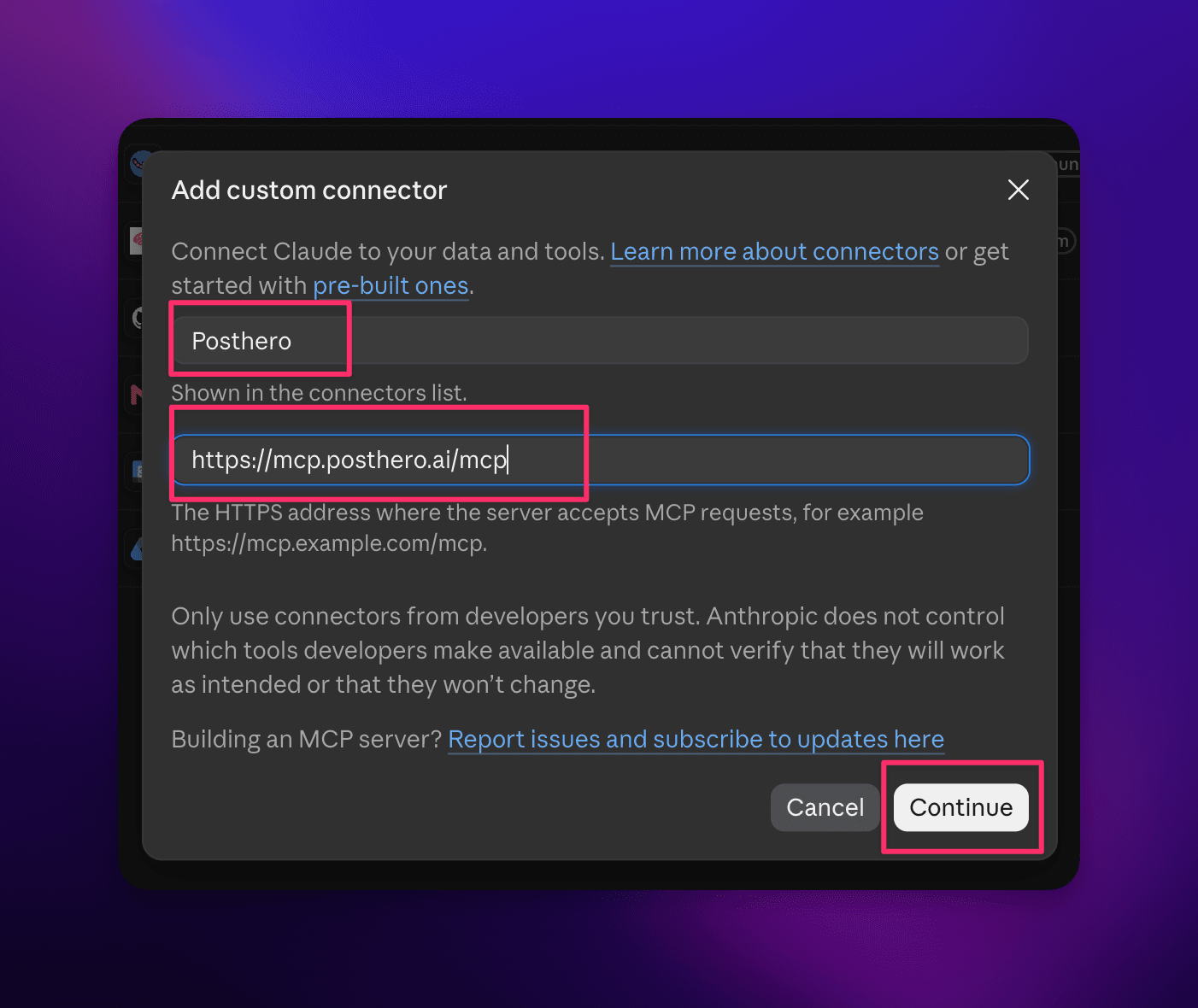
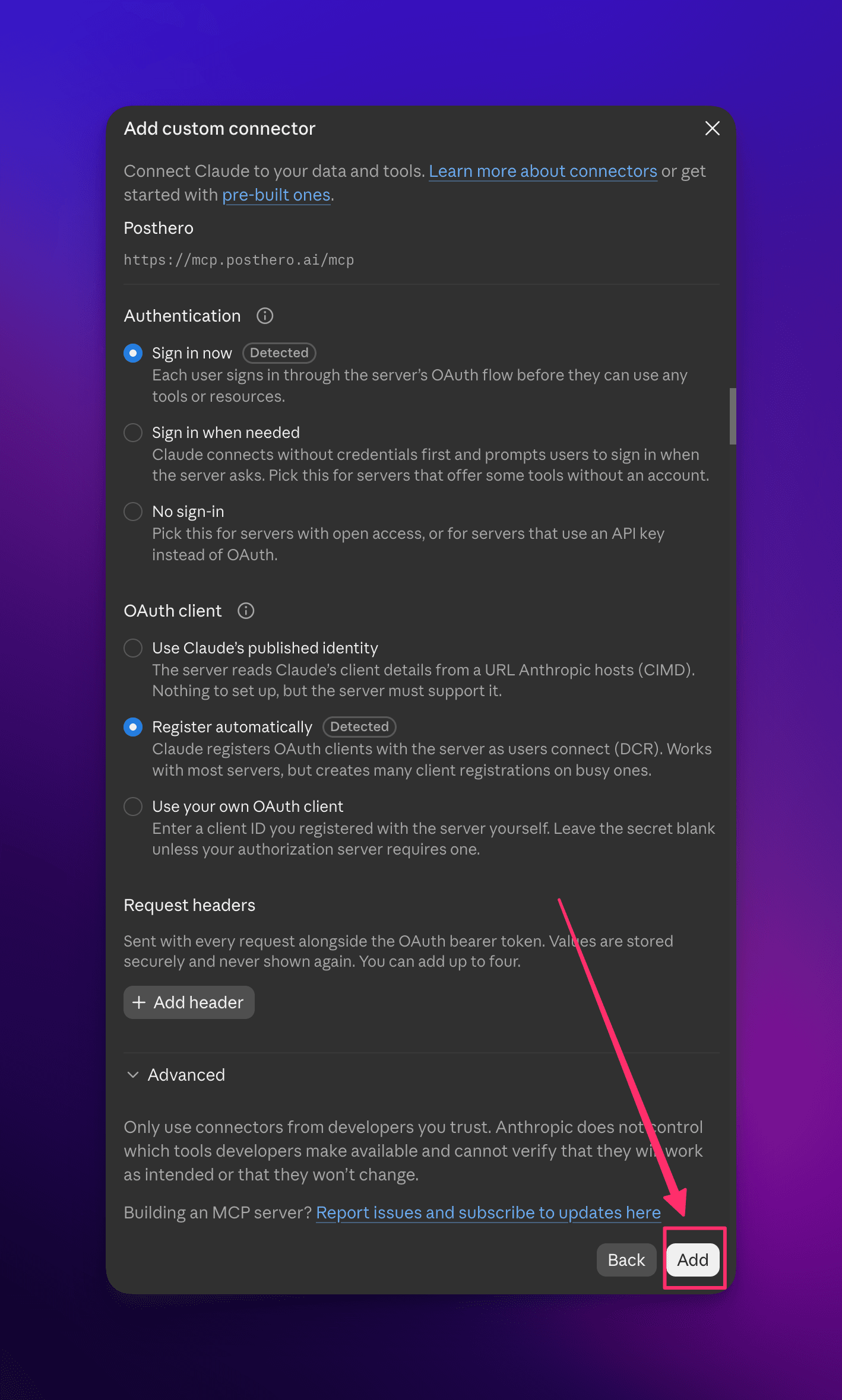
Then keep the defaults (“Sign in now”, “Register automatically”) and click Add.
Step 3: Sign in and allow access
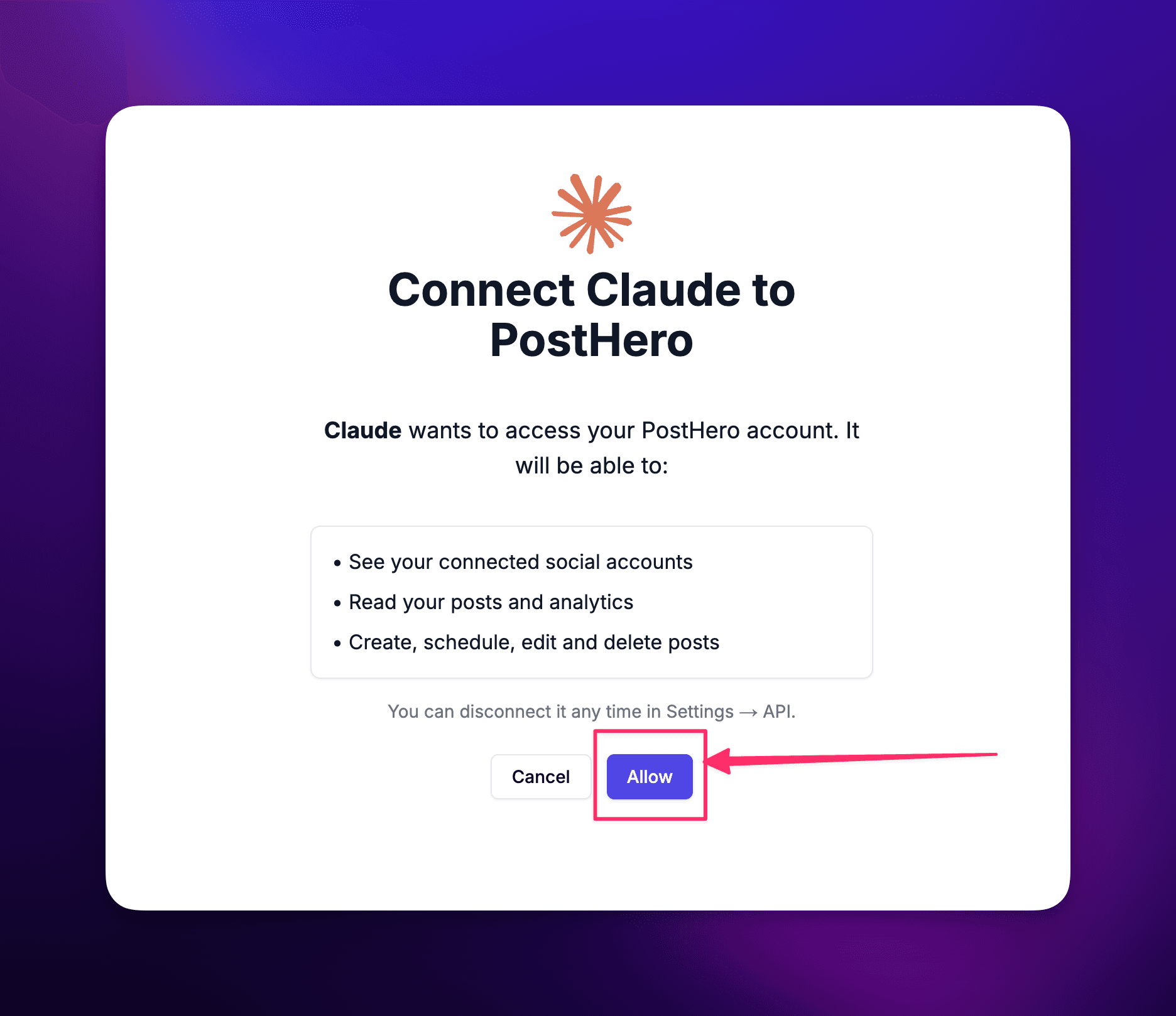
Sign in to PostHero with the same account you used in step 1 and click Allow.
Hide screenshotShow screenshot
Step 4: Turn it on and test it
In a new chat, turn PostHero on under + > Connectors and ask:
List my connected accounts
You can skip that for now, because everything below works in plain Claude. The connection matters later, when you want the finished post saved as a draft or scheduled from the same chat.
Claude writing style: where to set it in 2026
Claude has four places for writing style rules. Styles is the old menu, and it’s being replaced. A skill holds a voice you can call in any chat. Project instructions apply to every chat inside one Project. Instructions for Claude apply to every chat in your account. If you’re setting this up for the first time, start with a Project.
| Option | Where you set it | Applies to | Use it when |
|---|---|---|---|
| Styles (old menu) | “Use style” in the chat box | Chats where you pick it | You already have a style there. It’s moving to skills. |
| Skill | Plugins > Skills | Any chat, when the task fits or you name it | You want one voice you can call anywhere. |
| Project instructions | Inside a Project | Every chat in that Project | You write a lot in one voice, for one client or one channel. |
| Instructions for Claude | Settings | Every chat in your account | You have a few rules you want everywhere, like no em dashes. |
Based on Anthropic’s help pages, checked 24 November 2026.
What happened to Claude writing styles
Styles launched as a menu in the chat box. It had presets (Concise, Explanatory and Formal), and it let you build a custom style by uploading a sample of your writing or describing the style in words. Many of the guides that rank for this search were written in late 2024, and they still walk you through that menu.
Anthropic’s help page for the feature is now called Styles are moving to skills. Here’s what it says will change:
- Your custom styles are moved to skills automatically, and they arrive switched off.
- Concise, Explanatory and Formal won’t be available after the migration.
- The Learning style stays, as a skill you can add.
- The styles menu is removed once the migration is complete. Until then, your existing styles still work next to the new skills.
The page gives no date for any of this. So if you still see “Use style” in your chat box, it works today, but I wouldn’t build anything new there.
How to use a style after it becomes a skill
- Open Plugins > Skills.
- Find the migrated style and turn it on.
- In a chat, type a slash, then the style’s name with “-style” at the end.
Claude builds the command from the name, with lowercase letters and hyphens in place of spaces. Punctuation and emoji are dropped. Anthropic’s own example is a style named “concise pirate”, which becomes /concise-pirate-style.
One note on names: skills used to sit under Customize. Anthropic has renamed Customize to Plugins in the sidebar, and one Plugins page now holds your skills and connectors. Older guides and some help pages still say Customize > Skills.
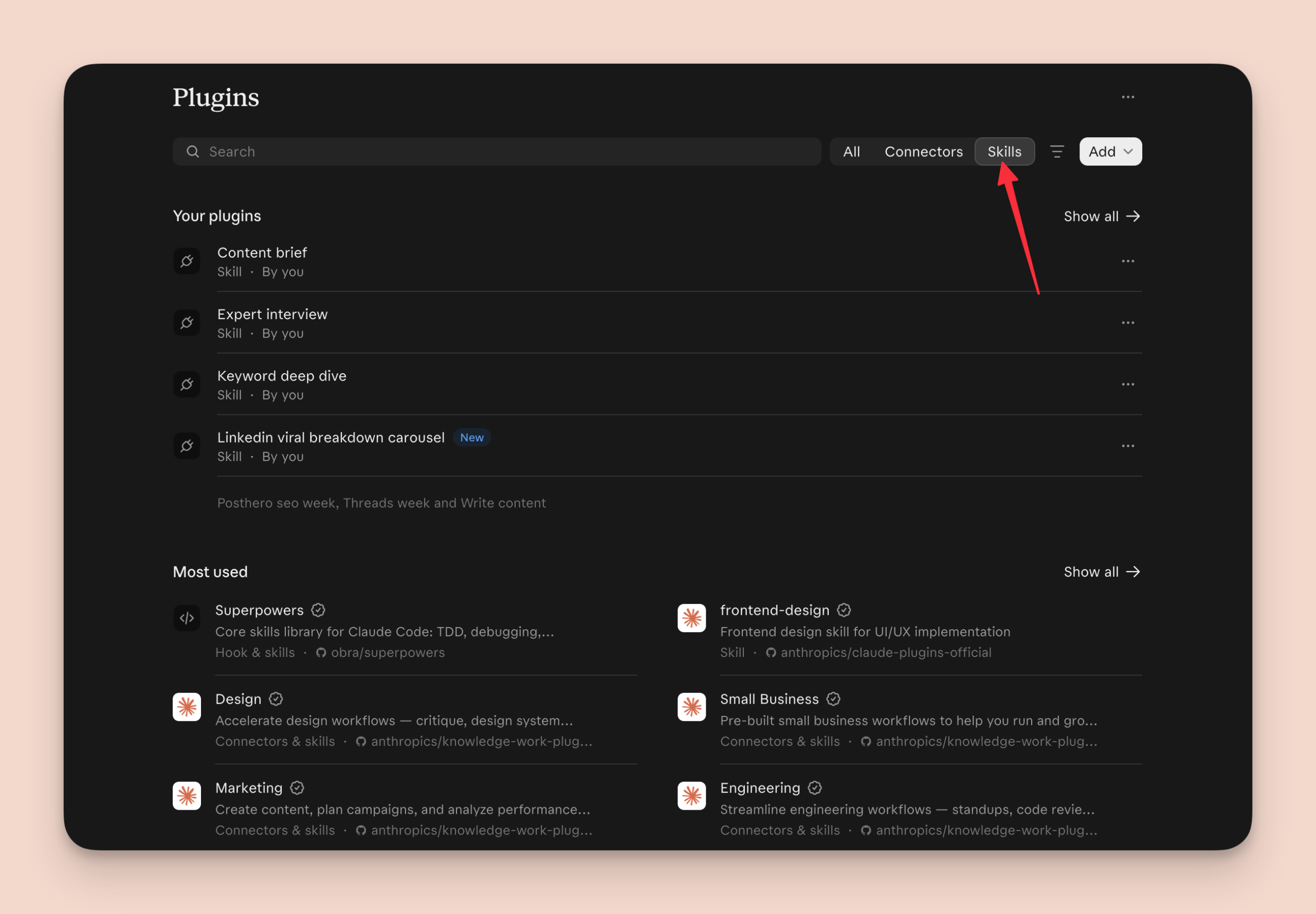
If you used the presets and don’t want skills at all, Anthropic’s fallback is to describe the same tone and format in your instructions. That’s option 3 below.
Did custom styles make Claude write like you?
Partly. Pangram, a company that sells an AI detector, tested the feature in December 2024. They built custom styles from real blog posts, and the output still read like AI to them and to their detector. They also found the presets were close to typing “be concise” in the prompt. It’s a vendor’s test on short essays, so I wouldn’t read too much into it.
It fits my own experience, though: good posts come from giving Claude personal input and stories. A style can copy your rhythm and your word choice, but it has no idea what happened to you this week, and readers notice a missing story faster than a wrong word. So whichever option you pick below, plan to bring your own notes.
Option 1: a writing style skill built from your posts
This is the closest thing to the old “custom style from samples”. A skill is a set of instructions that Claude loads when the task calls for it. Anthropic’s skills page says they’re on every plan, Free included, and that they need code execution switched on. You’ll find that under Settings > Capabilities, as “Code execution and file creation” (“Create and edit files” in the newer Settings layout).
- Collect your posts. Pick a handful you wrote yourself, from before you used AI if you have them. Keep them to one platform, because a LinkedIn post and an X post don’t sound the same.
- Start a new chat and paste the prompt below. Add your posts at the end.
- Correct the description. Claude shows you how it reads your style. Fix what’s wrong before it builds anything, because the skill will repeat every mistake in that description.
- Save the skill. Then open Plugins > Skills and check that it’s turned on.
- Test it. Ask for a post, then open the steps Claude took and look for your skill’s name. If it isn’t there, name the skill in your prompt.
I want to create a skill that makes you write in my voice. Below are posts I wrote myself. First, describe my style in short bullets: how long my sentences are, how I open a post, how I end one, words I use a lot, words I never use, how I break lines and how formal I am. Show me the bullets and wait for my corrections. Then build the skill from the corrected bullets, and keep two of my posts inside it as examples. Write the skill’s description so it says to use this skill whenever I ask for a social post or a reply. My posts: [paste them here]
If the skill exists and Claude doesn’t use it, look at the description first. Claude decides from the skill’s description, which Anthropic limits to 200 characters. So the description has to say when to use the skill, and “my writing style” on its own isn’t enough.
A copy-paste Claude writing style
If you’d rather write the rules yourself, start from this block. It works as the body of a skill and as a part of your Project instructions. While the old menu is still there, it also works as a custom style: choose “Describe style instead”, then “Use custom instructions”.
My writing style. Use it for everything you write in my name.
I like:
– Plain words I’d say out loud.
– Short paragraphs with one idea in each.
– A real number, name or date wherever I gave you one.
– First person and contractions.
I don’t like:
– Posts that sound polished or expert. I write like a person on social media.
– Selling. Don’t pitch unless I ask for it.
– Openers that warm up before the point.
– Endings that repeat what the post already said.
Hard rules:
– No em dashes. Use a comma, or start a new sentence.
– Use only the facts and stories I give you. If something is missing, ask me first.
– Write for the platform I name. Don’t reuse a LinkedIn post on X.
– If you’re not sure a line sounds like me, show me two versions.
The block is 12 lines, and that’s on purpose. Change the lines to match how you write, but don’t let it grow into a page. The reason is in the section on my setup.
Option 2: Project instructions
A Project is a workspace with its own files and its own instructions, and every chat you start inside it follows them. I keep the SEO work for this blog in one Claude Project: one chat for planning, and a new chat for each article.
- Open Projects in the sidebar, or go to claude.ai/projects, and click “+ New Project”.
- Give it a name, like “LinkedIn posts”.
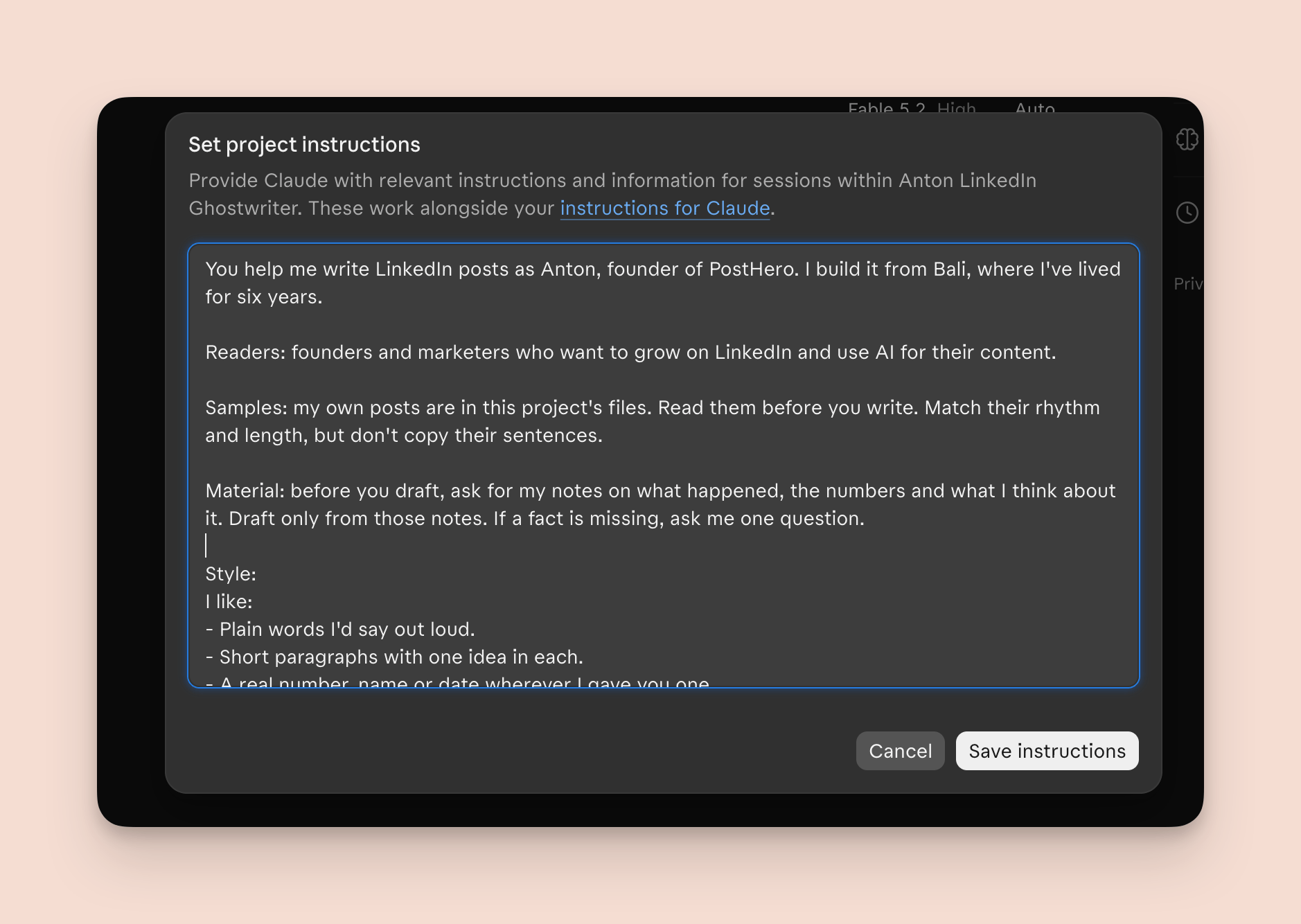
- On the right side of the project page, click “Set project instructions”. Paste the block below, fill in the brackets and click “Save instructions”.
- Add your own posts to the project knowledge with the “+” button.
- Start every writing chat from inside the Project.
You help me write [what you write, for example LinkedIn posts] as [your name], [one line about who you are].
Readers: [who reads you].
Samples: my own posts are in this project’s files. Read them before you write. Match their rhythm and length, but don’t copy their sentences.
Material: before you draft, ask for my notes on what happened, the numbers and what I think about it. Draft only from those notes. If a fact is missing, ask me one question.
Style: [paste your style block here]
Edits: when I send back a changed version of your draft, tell me in one line what I changed, and ask whether it should become a rule.
Two details from Anthropic’s Projects page are worth knowing. Chats in a Project don’t share context with each other, so anything Claude should remember has to sit in the instructions or the files. And free accounts can create up to five Projects. Anthropic’s personalization guide lists project instructions under paid plans, so on a free account, check that you see the button.
If you write for clients, give each one their own Project with their own samples. Then one client’s voice can’t leak into another’s drafts.
Option 3: Instructions for Claude
These are the account-wide instructions, and Claude applies them to every conversation. Click your initials in the lower left corner and open Settings. Then go to “Your Claude” (it’s “Account” in the older layout) and write your rules under Instructions.
Keep this box for rules that are true in every chat. The em dash rule is a good fit, and so is “use plain words”. A voice for LinkedIn posts isn’t, because the same rules would then shape your emails and your code reviews too.
My setup: the rules I give Claude
My own rules are short:
- No em dashes. Use a comma, a hyphen or a colon.
- Plain words.
- Write in the platform’s casual style, and don’t pitch anything.
- Start from my notes: what happened and the numbers behind it.
Where they live depends on the job. My Threads posts come from a skill I run every week. It picks a topic, writes 9 core pieces and saves the week as drafts in PostHero (the system is in the Claude Threads guide). This blog has its own skill with the article rules, like real numbers only and no em dashes. So I use skills for the jobs I repeat every week, and a Project for work that shares files.
Two problems come up most: general AI slop, and a LinkedIn post copied straight to another platform. Close behind is content that’s too polished and too expert. People don’t write like that on social media, which is why “polished” sits in the “I don’t like” list above.
Rules don’t write the post, though. Between 12 September and 10 November this year, the top post on my Threads account was a thread about moving to Bali six years ago. It got 10,900 impressions out of about 48,000 for the whole period. No style setting could have come up with that story. Claude helped me tell it.
Before and after
Example, written for this article. Claude wrote both versions. The request was a LinkedIn post about Styles moving to skills. The first version had no rules. The second had the 12-line block and my notes from Anthropic’s help page.
Before
Big news for Claude users! Anthropic is transforming the way we personalize AI. Styles are evolving into Skills, and it’s not just a rename, it’s a whole new way to work. Here’s why this matters for your content journey:
After
Claude’s Styles menu is going away. Anthropic is moving custom styles into skills, and they arrive switched off. If you built a style from your own writing, open Plugins > Skills and turn it on, then call it with a slash and its name. Concise, Explanatory and Formal are being removed. If you used those, write the rule into your instructions.
The second version has something to say because the notes had facts in them. The rules only cleared out the padding.
Turn your edits into rules
This is the habit I’d add first. When you change a draft, send your version back and ask Claude what you changed. A good change becomes one new line in the style block.
I edited your draft, and my version is below. Compare the two and list what I changed, one line each. Then tell me which of those changes should become a rule in my style block, written as a single line. Don’t add anything until I say yes. My version: [paste your edited post]
Why the block is short
I took the idea from Ruben Hassid, who writes the How to AI newsletter. His setup changed a lot this year. In January he built one long voice file from a 100-question interview. By October he wrote that he has no about-me file at all. Claude learns from his 127 past issues, every correction he makes becomes a rule, and a second Claude checks each draft against those rules. In his last issue he kept 438 of the 2,303 words Claude wrote.
His taste file is now 13 lines in three lists. He also warns, in his post on prompting Claude’s newest model, that rules with “never” and “always” get followed too rigidly. That’s why my block has only four hard rules, and why the em dash ban says what to use instead.
The check works better in a fresh chat than in the one that wrote the draft. Paste the “check my draft” prompt from the 122 AI words to avoid into a new chat and give it your post. I’d keep that long word list for the check and leave it out of the style block.
Does a Claude writing style make Claude sound human?
It gets you part of the way. A style changes how the text sounds, so it helps with rhythm and formality. Two things are outside its reach.
The first is the common AI words and patterns. Those need an edit pass, and the list of 122 AI words covers them. The second is material. A model can’t know your story or your numbers, so you have to bring them. I wrote up that method, with prompts that work in Claude too, in how to make ChatGPT sound human.
Where PostHero fits
PostHero has a writing style option of its own: you upload your posts there as tone-of-voice examples. It’s only an option, though. Most of our users do their writing in Claude and keep all their projects in one place, so that’s where your style rules should live.
PostHero’s job starts after the writing. Claude saves the post as a draft and schedules it on 8 platforms from the same chat. The Claude LinkedIn guide shows the full flow on one platform, and the hub covers how to connect Claude to social media on all of them.
FAQ
Are Claude Styles gone?
Not yet, but they’re on the way out. Anthropic’s help page says custom styles are being moved to skills and that the styles menu will be removed when the migration is complete. Your existing styles keep working until then. The page gives no date.
How do I make Claude write like me?
Give Claude two things up front: your own posts as samples and a short list of rules. Put them in a skill or a Project so you don’t paste them into every chat. Then bring your notes for each piece, and turn your edits into new rules, one line each.
How do I train AI to write like me?
You don’t train the model itself. “Training” here means saving instructions and writing samples that the AI reads before it writes. In Claude that’s a skill, a Project or your instructions. In ChatGPT it’s custom instructions, and the steps are in how to make ChatGPT sound human.
Can I set a Claude writing style on the free plan?
Yes. Anthropic lists skills on every plan, Free included, as long as code execution is on. Projects are on free accounts too, with a limit of five.
Should I use a skill or a Project?
Use a skill when you want the same voice in any chat, for example for quick replies. Use a Project when the work shares files, like a client’s past posts or a content plan. They also work together: a Project for the client, and a skill for a job you repeat inside it.
Why does Claude ignore my writing style?
There are two usual reasons. Either the skill didn’t load, so check its description and name it in your prompt. Or the chat got long and the rules faded, so start a new one. A style block that has grown past a page can also contradict itself, which is one more reason to keep it short.
PostHero for Claude
Write it in your style, post it from the same chat
Connect Claude to 8 platforms in 2 minutes. Claude writes the post, PostHero saves it as a draft and schedules it.
7-day free trial. Everything starts as a draft.