Claude Animation: How I Make Faceless Videos in One Chat

Yes, Claude can make animations. A Claude animation is code: Claude writes every scene (text, shapes, numbers and photos, all moving), and then something else turns that code into a video. So which “something else” you pick decides what you get: a loop that plays in the chat, a file for your app, a motion graphic, or a faceless video ready to post.
I’m Anton, founder of PostHero. I built our Claude connector, and short animated videos are the part of it I’ve spent the most time on. This guide compares the five ways to make a Claude animation, then walks through my own workflow, scene by scene: the one that took a faceless reel of mine from my usual 64 views to 719. And if you post on more than one platform, the same setup also covers all your social media.

 Setup · 2 minutes
How to connect Claude to make and post animations
One connector for 8 platforms. Set it up once, and Claude can work on your Instagram from any chat.
- Reels and carousels
- Profile audit
- Competitor research
- Viral reels
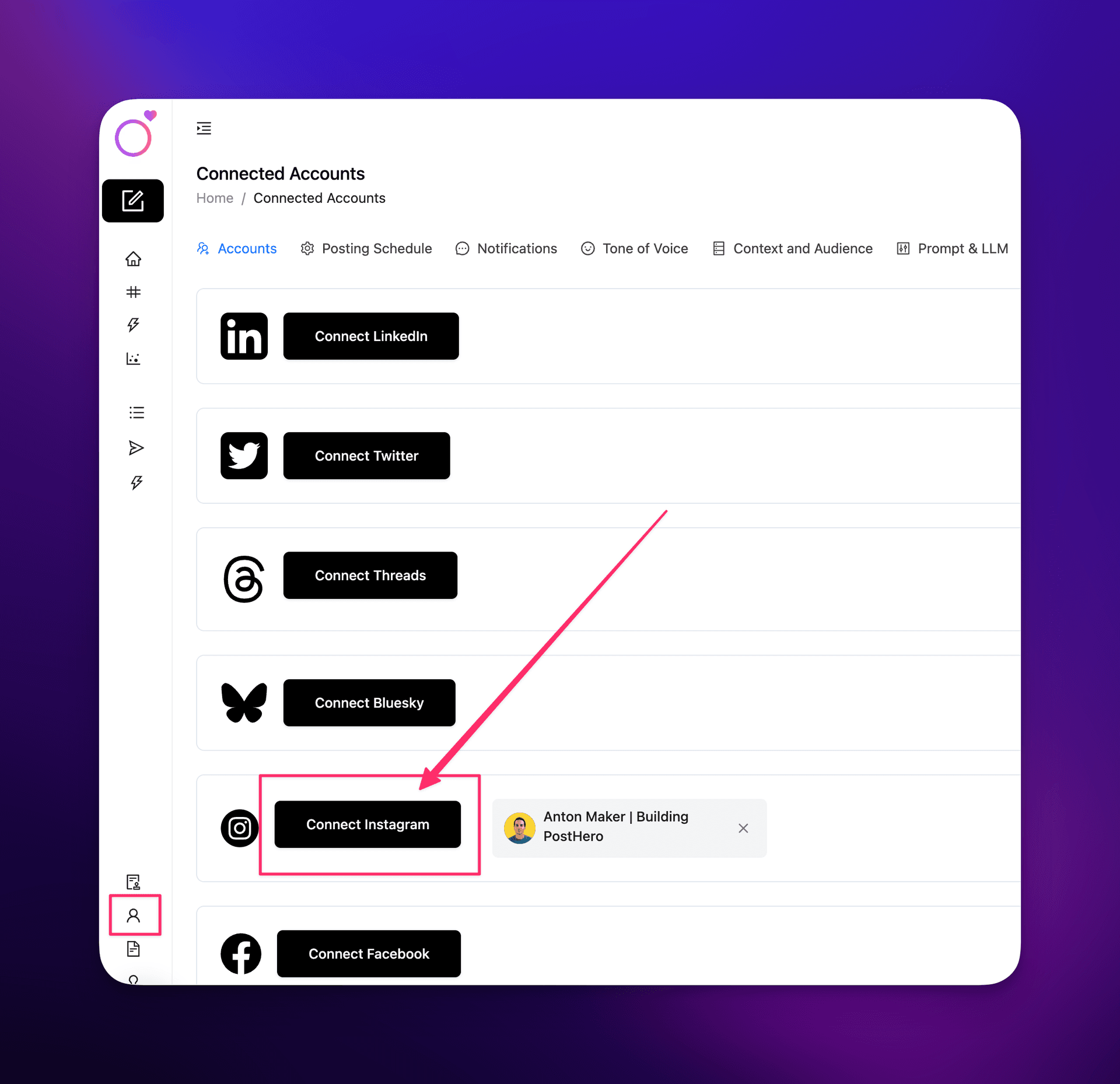
Step 1: Connect your Instagram account
Create a PostHero account and connect your Instagram account. Instagram asks you to approve access on its own screen, so Claude never sees your password.
Hide screenshotShow screenshot
Step 2: Add the connector in Claude
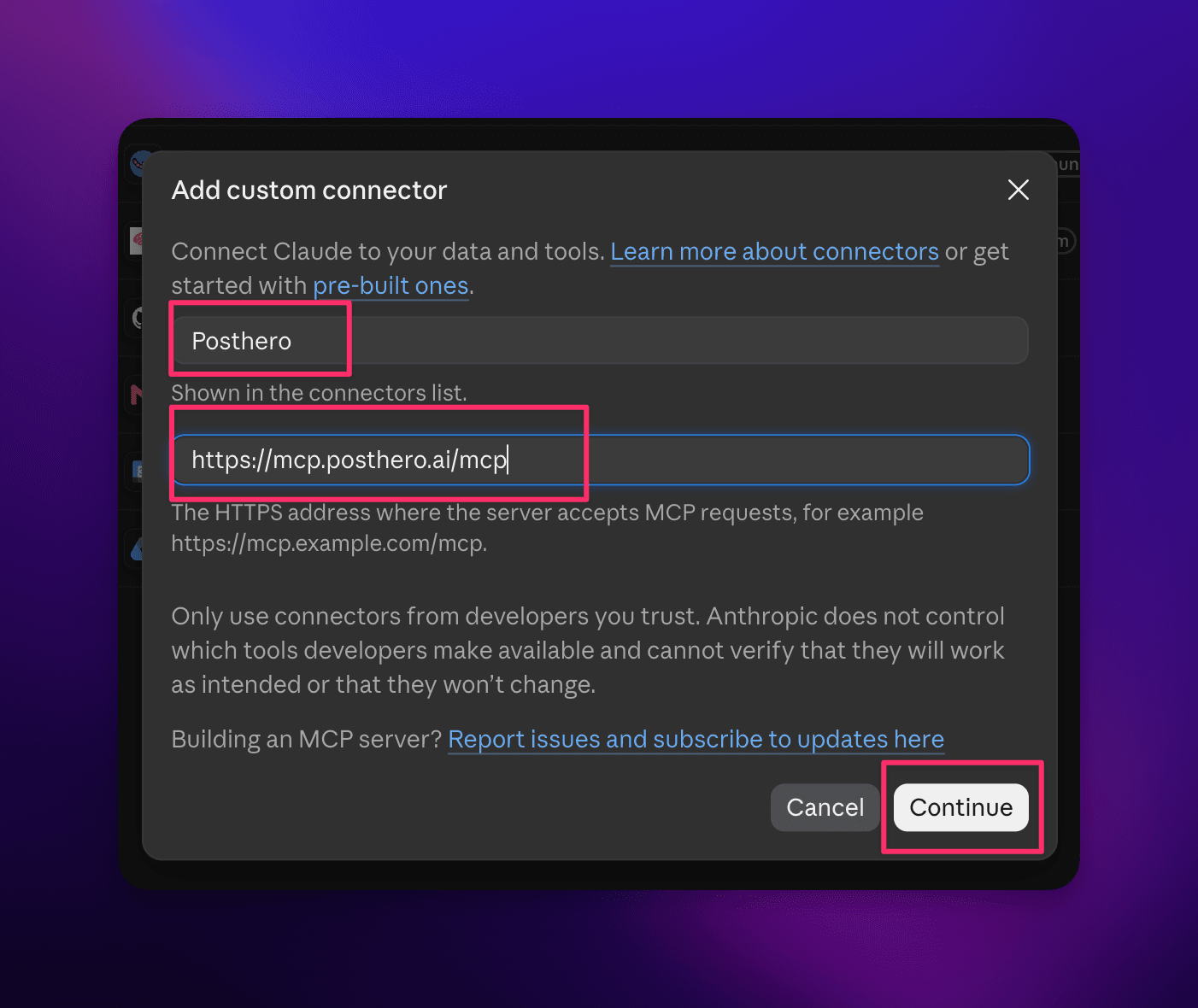
In Claude, open Customize > Connectors, click + Add, then Add custom connector. Name it PostHero, paste the URL and click Continue.
Hide screenshotsShow 2 screenshots
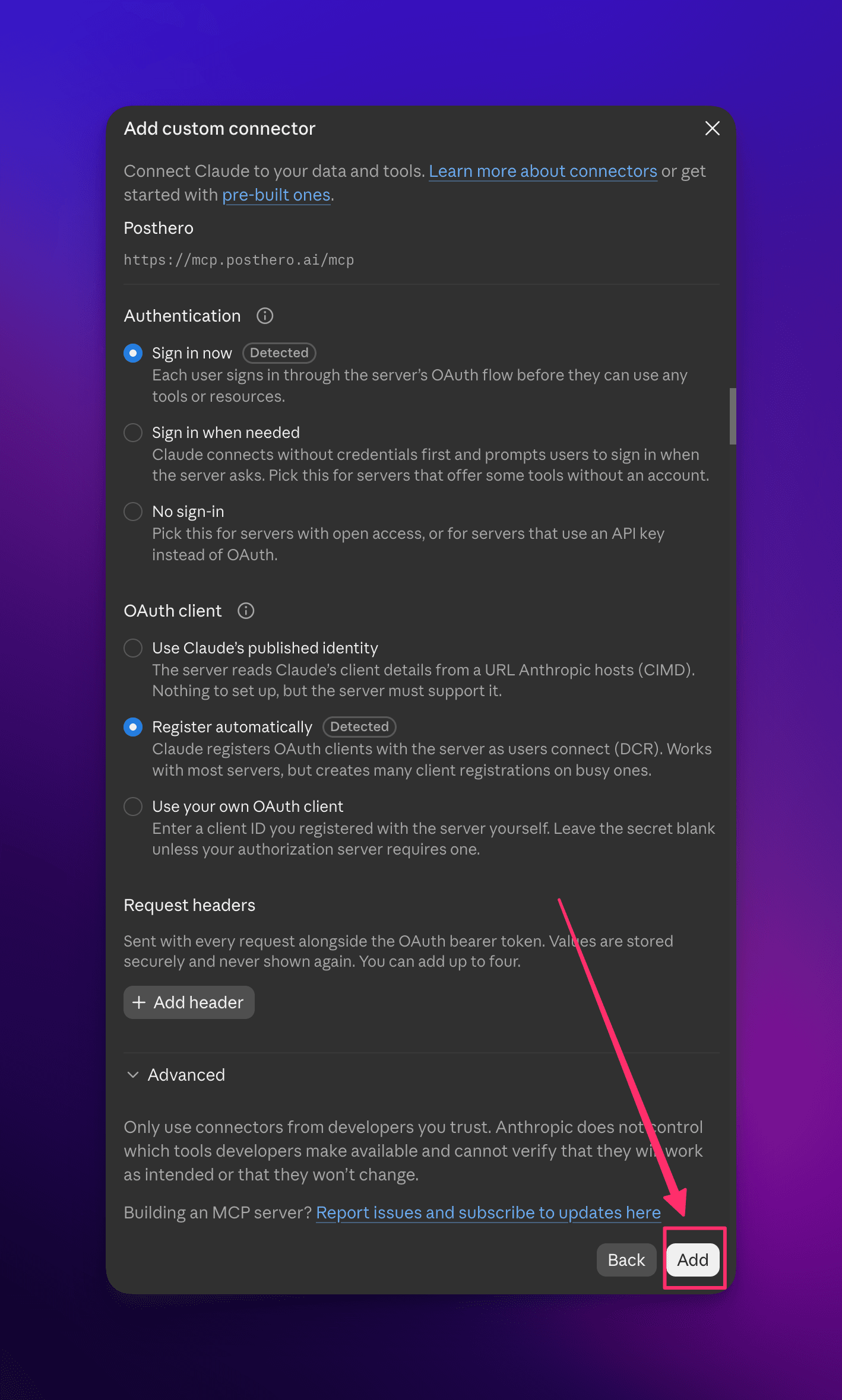
Then keep the defaults (“Sign in now”, “Register automatically”) and click Add.
Step 3: Sign in and allow access
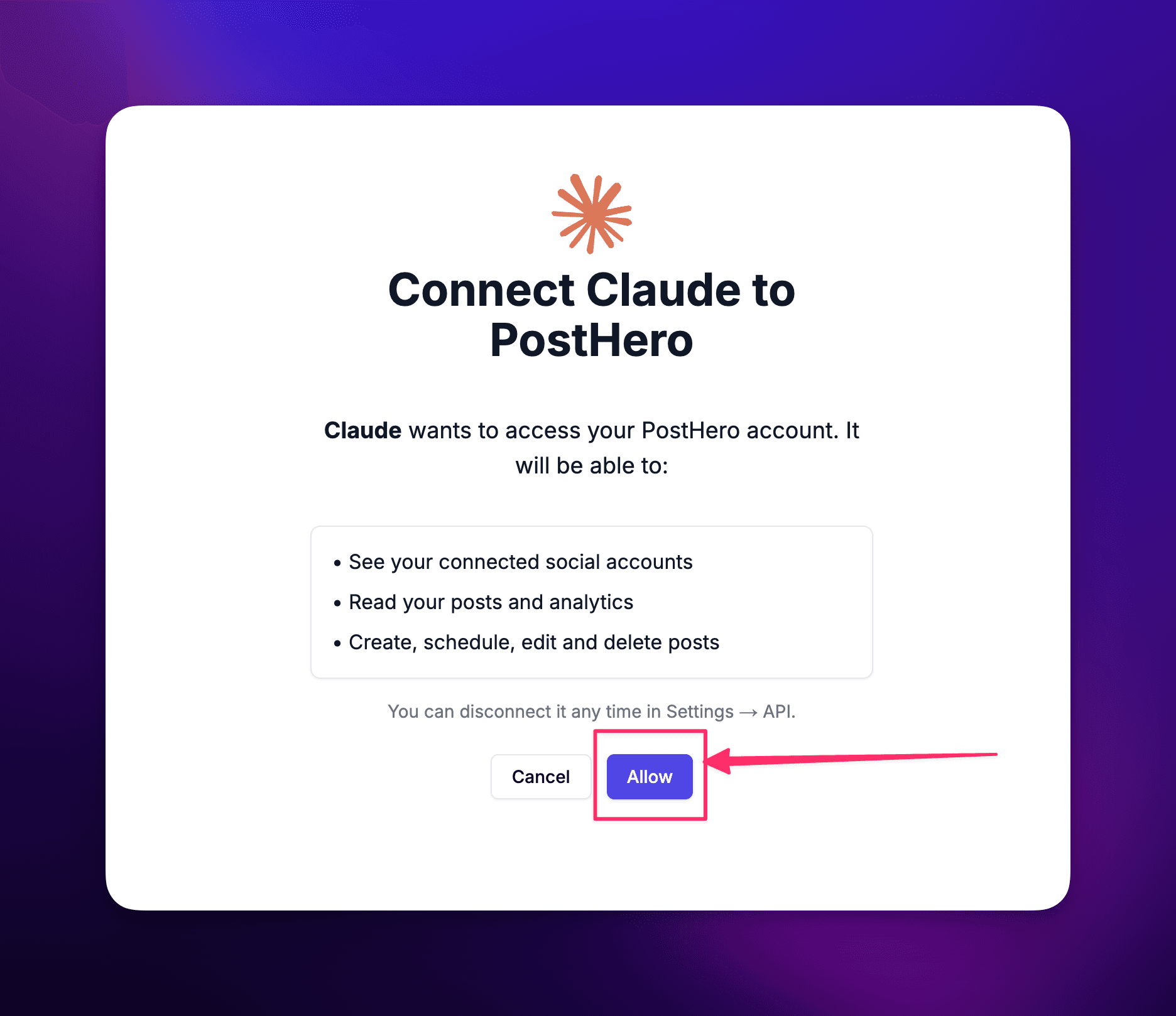
Sign in to PostHero with the same account you used in step 1 and click Allow.
Hide screenshotShow screenshot
Step 4: Turn it on and test it
In a new chat, turn PostHero on under + > Connectors and ask:
List my connected accounts
After that, you only tell Claude which platform the video is for. For example, one animation can go out as an Instagram reel, a YouTube Short and a TikTok from the same chat.
5 ways to make a Claude animation, compared
There are five ways to make a Claude animation: an artifact (SVG, CSS or HTML), Claude Motion, Claude Design, Claude Code with Remotion or Lottie, and a rendering connector such as PostHero. They all work the same way underneath, because Claude writes the animation as code. They differ in who turns that code into something you can post.
That’s worth understanding before you pick one. A video model generates footage, while Claude writes instructions: where each word sits, when it appears, how the number counts up. As a result, a Claude animation is exact and easy to fix. Change one word or one timing and everything else stays as it was.
| Way | What you get | Where it runs | Good for |
|---|---|---|---|
| PostHero | A vertical video with music or a voiceover, saved as a draft | In the chat, no terminal | Faceless videos for reels, Shorts and TikTok |
| Claude artifact (SVG, CSS, HTML) | An animation that plays in the chat. A web page, not a video file | In the chat | Loops, icons, animated diagrams, trying an idea |
| Claude Motion | A short animation of text, charts, shapes and images, exported as MP4 | In Claude, beta on Team and Enterprise plans | Explainers, animated charts, product walkthroughs |
| Claude Design | Designs and interactive prototypes, exported as HTML, PDF or PPTX | In Claude, every plan | Motion inside an interface: buttons, hovers, prototypes |
| Claude Code + Remotion or Lottie | Motion graphics as video (Remotion), or Lottie files, MP4 and GIF (LottieFiles) | Remotion: your computer and a terminal. LottieFiles: hosted | Full control, custom styles, app and website animation |
Based on each vendor’s own pages, checked 23 November 2026.
Which Claude animation method should you use?
- Use an artifact when you want to see an idea move right now. Ask for an animated SVG or a small HTML page and it plays next to the chat. It’s a web page though, so getting a video out of it means recording or rendering it yourself.
- Use Claude Motion if your company is on a Team or Enterprise plan and you need an explainer or an animated chart as an MP4. It’s Anthropic’s own animation feature, and it’s still in beta.
- Use Claude Design for motion that lives inside a product, such as a button that turns into a checkmark or a pricing card that lifts on hover. Older tutorials show a video export in the standalone version, but Anthropic’s help page lists none today, so I wouldn’t plan a video workflow around it.
- Use Claude Code with Remotion if you’re comfortable in a terminal and want full control over the style. For example, there are open-source Claude Code skills for looks like stick figures and 3D cartoon explainers, and they render on your own computer with Node.js, Python and ffmpeg installed.
- Use Lottie when the animation is going into an app or a website. LottieFiles’ Creator MCP connects to Claude and exports real Lottie files.
- Stay in After Effects for frame-by-frame character work and heavy compositing, because that’s still its home.
- Use PostHero when the goal is a faceless video on your feed this week. Claude designs it, PostHero renders it, and then it’s waiting as a draft on the platform you named.
What a Claude animation is made of in PostHero
One design choice explains why I built PostHero the way I did. Most tools that make videos design them inside their own editor or template, but I went the other way: Claude designs every scene first, and PostHero only renders the finished design. Claude is good at layout, so each video gets its own look instead of a template with your words swapped in.
So here’s what Claude can put into a video through PostHero, checked against the connector’s own tools:
- Animated text: big words that rise, wipe and pop, one idea per scene.
- Motion graphics: counters that count up, chat bubbles, checklists that build, underlines and arrows that draw themselves, plus phone and app mockups.
- Photos: free stock photos, AI images or your own uploads, usually with a slow zoom behind a few words.
- Your own clips: footage from your PostHero media library, with animated overlays and word-by-word captions on top.
- Sound: licensed instrumental music, an AI voiceover in English, and small sound effects on the moments that land, such as a pop when a card appears or a ding on a result.
- Format: vertical, 5 to 60 seconds, although 15 to 30 seconds works best in practice.
- Your look: save a brand book once and Claude follows it in every video. Mine is beige with a single yellow accent and Inter for headlines, so I never describe it again.
How I make faceless videos with Claude animation, step by step
My first videos made with Claude weren’t broken, but they were forgettable, the kind you scroll past without noticing. I was typing things like “make a reel about social media scheduling” and getting exactly that: the average of every video ever made on the topic.
The workflow below is what replaced it, and it’s how I make faceless videos with Claude today. It has four steps, and nothing reaches PostHero until I approve the storyboard.
Step 1: Break down a video that already works
I don’t start from a topic anymore. Instead, I start from proof: a recent video in my niche that clearly beat its account’s normal numbers. With PostHero connected, Claude can search a library of viral Instagram reels and sort them by views compared to followers, so small accounts with big hits come up first.
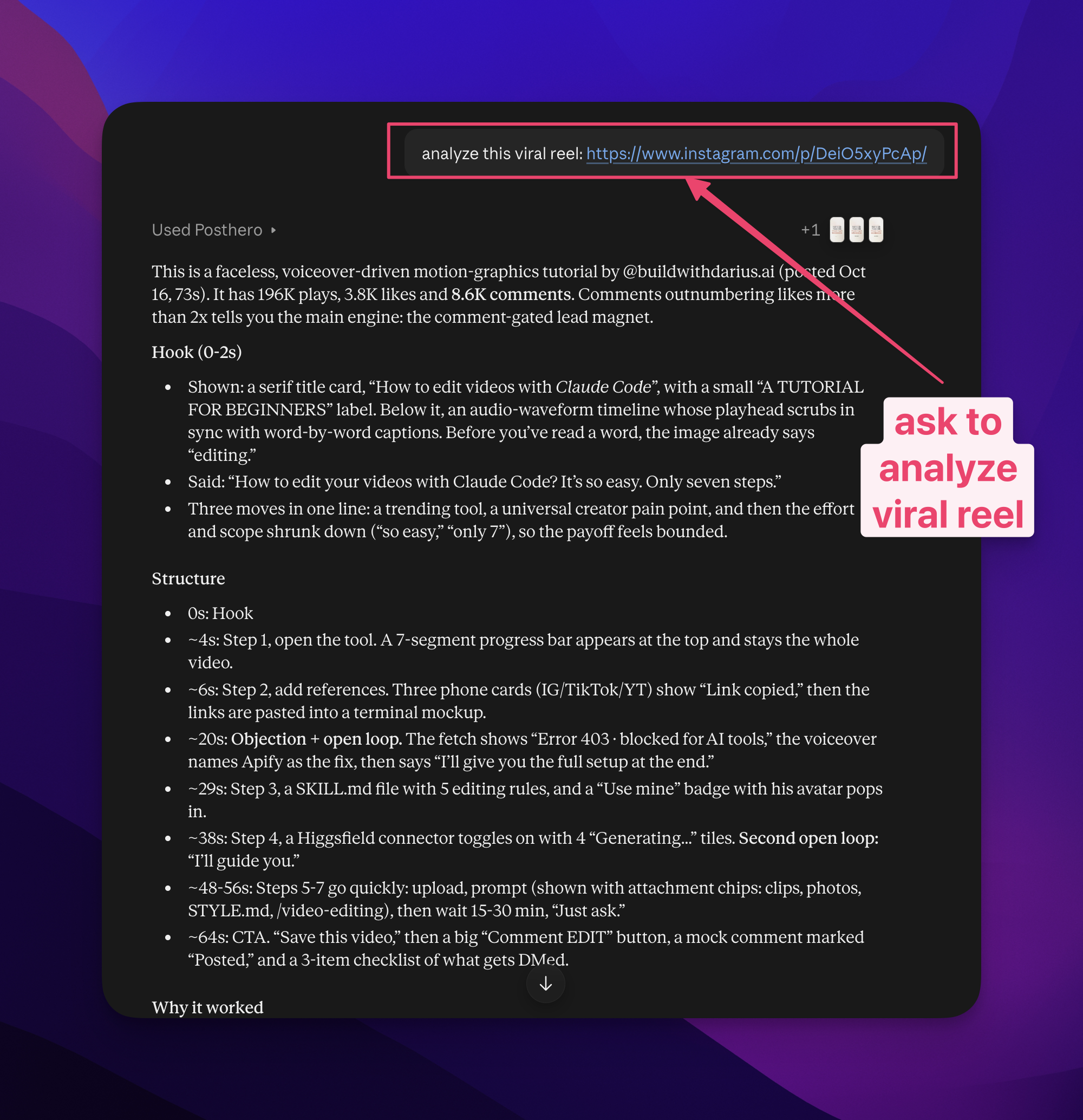
Then Claude breaks the video down from its frames and transcript: what’s on screen in the first two seconds, the order of the points, where the payoff lands, why people shared it. For a TikTok or a Short, describe the video or paste its transcript instead, and ask for the same thing.
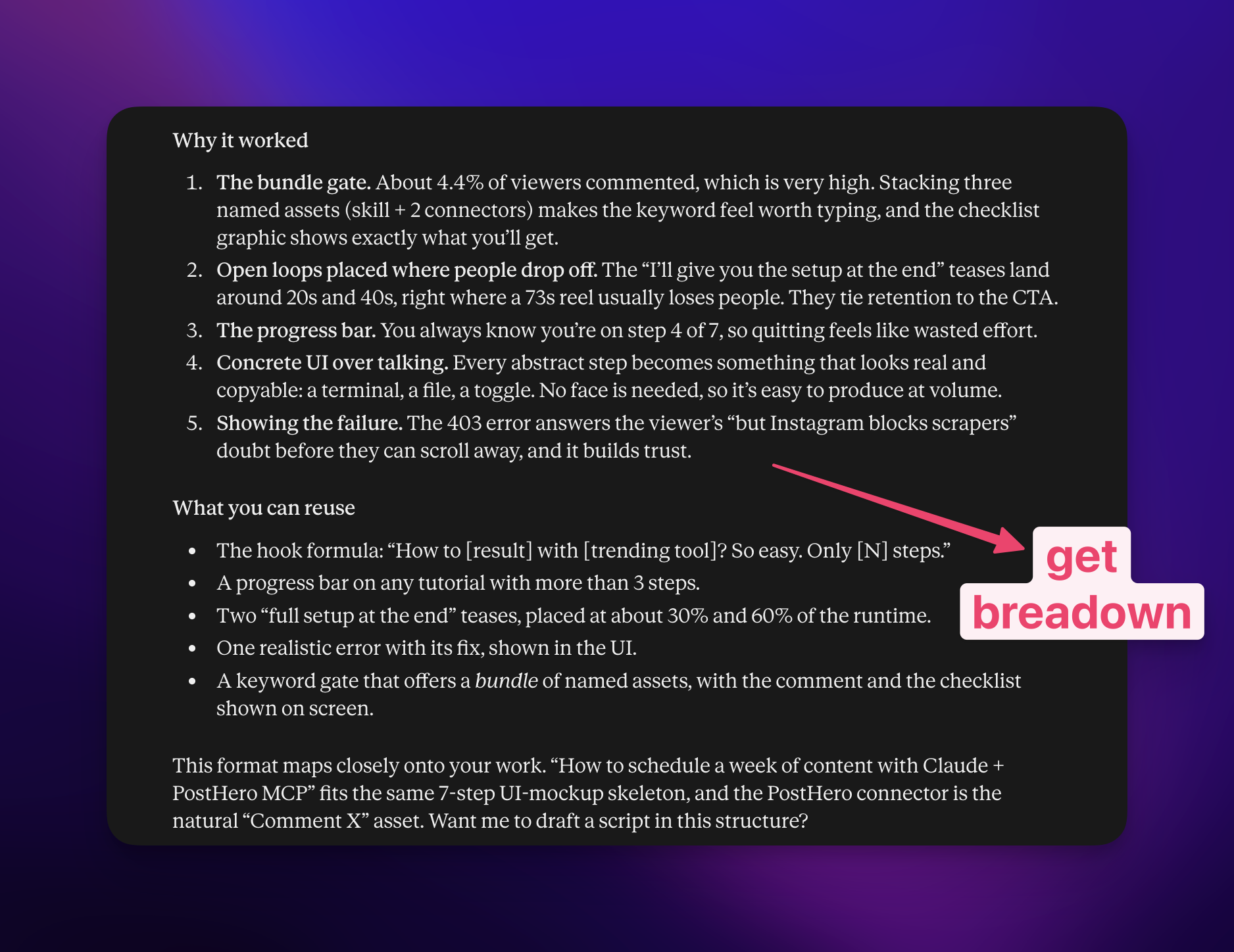
After that, I borrow the structure, never the words: same skeleton, my topic.
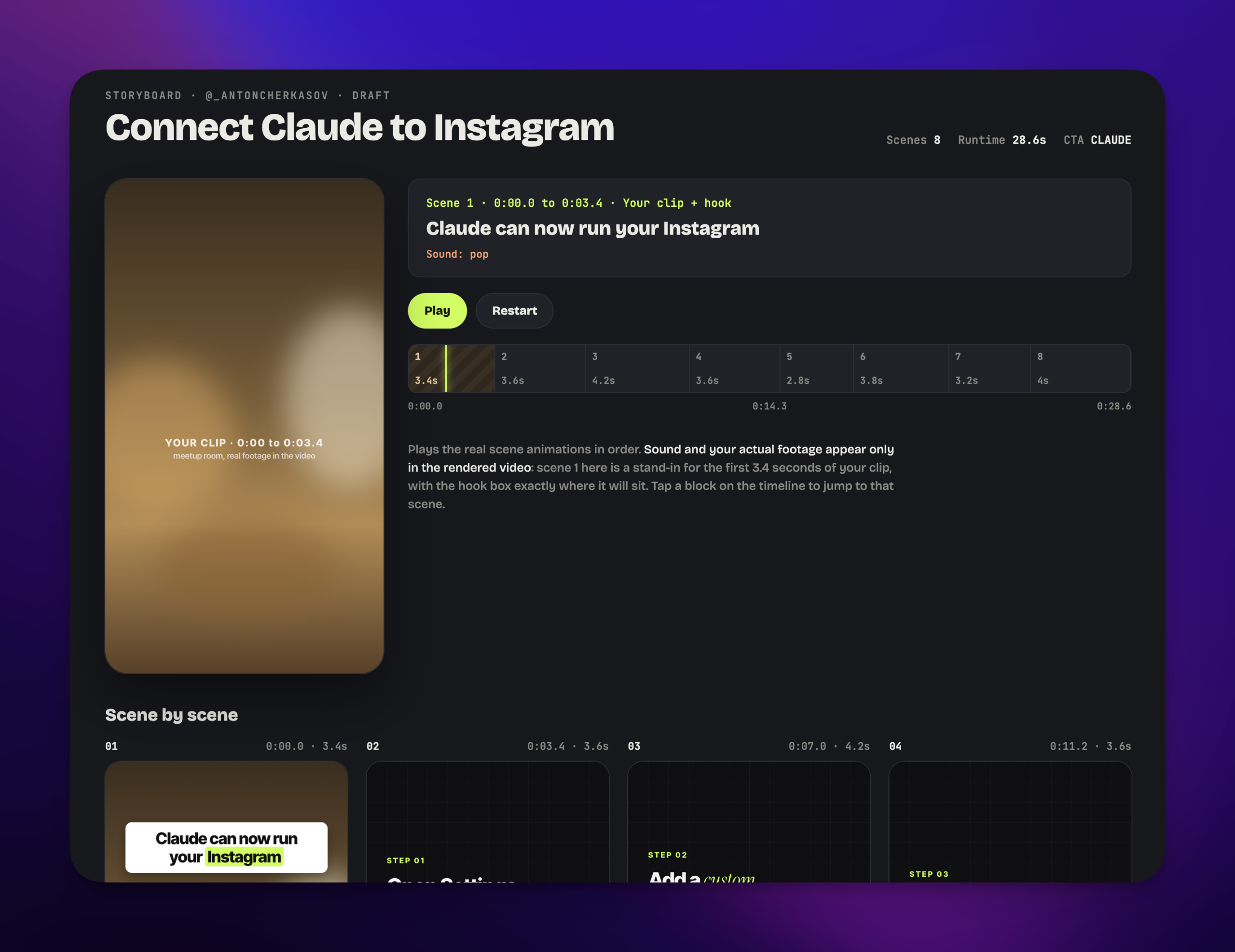
Step 2: Approve the storyboard, scene by scene
Claude lists the scenes, one line each, and waits for a yes. Then it shows one still per scene in the chat.
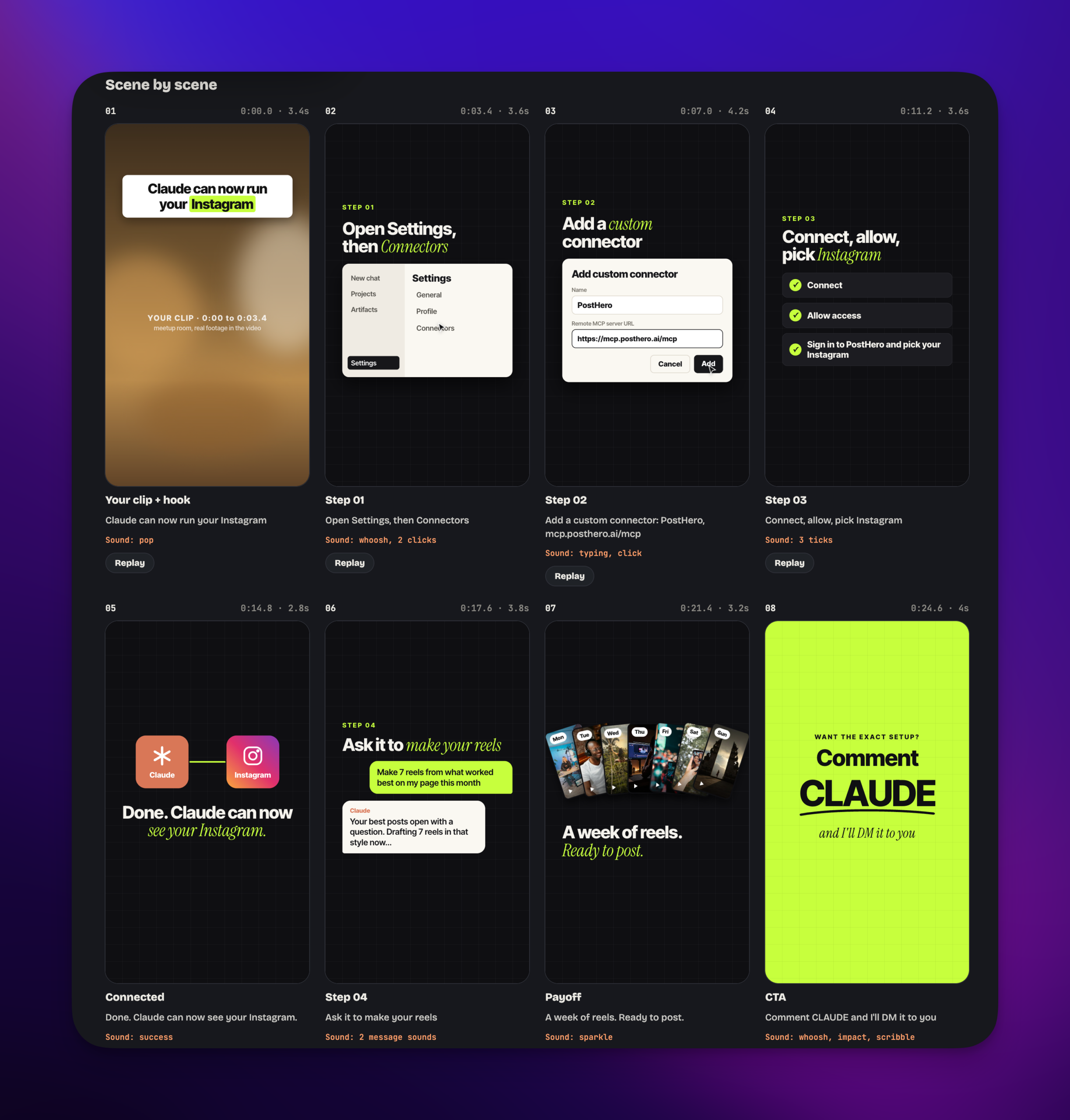
The storyboard shows the layout, not the motion, so you see the movement for the first time in the video. That’s on purpose, because a re-render takes time, while changing a line in the chat costs nothing. So this is the step to be picky on.
Before you say yes, check every still for four things:
- One idea per scene, in 3 to 10 words. If you can’t read it in a second, it’s too long.
- The headline is there on the very first frame, otherwise the cover is blank.
- One or two things move at a time, because smooth beats busy.
- Nothing important sits at the edges, since that’s where the app puts its buttons and your caption.
Step 3: Pick the sound and render
Once the storyboard is approved, Claude asks one question: music, a voiceover, both, or silent? In the same message it also lists the sound effects it planned and asks which to keep.
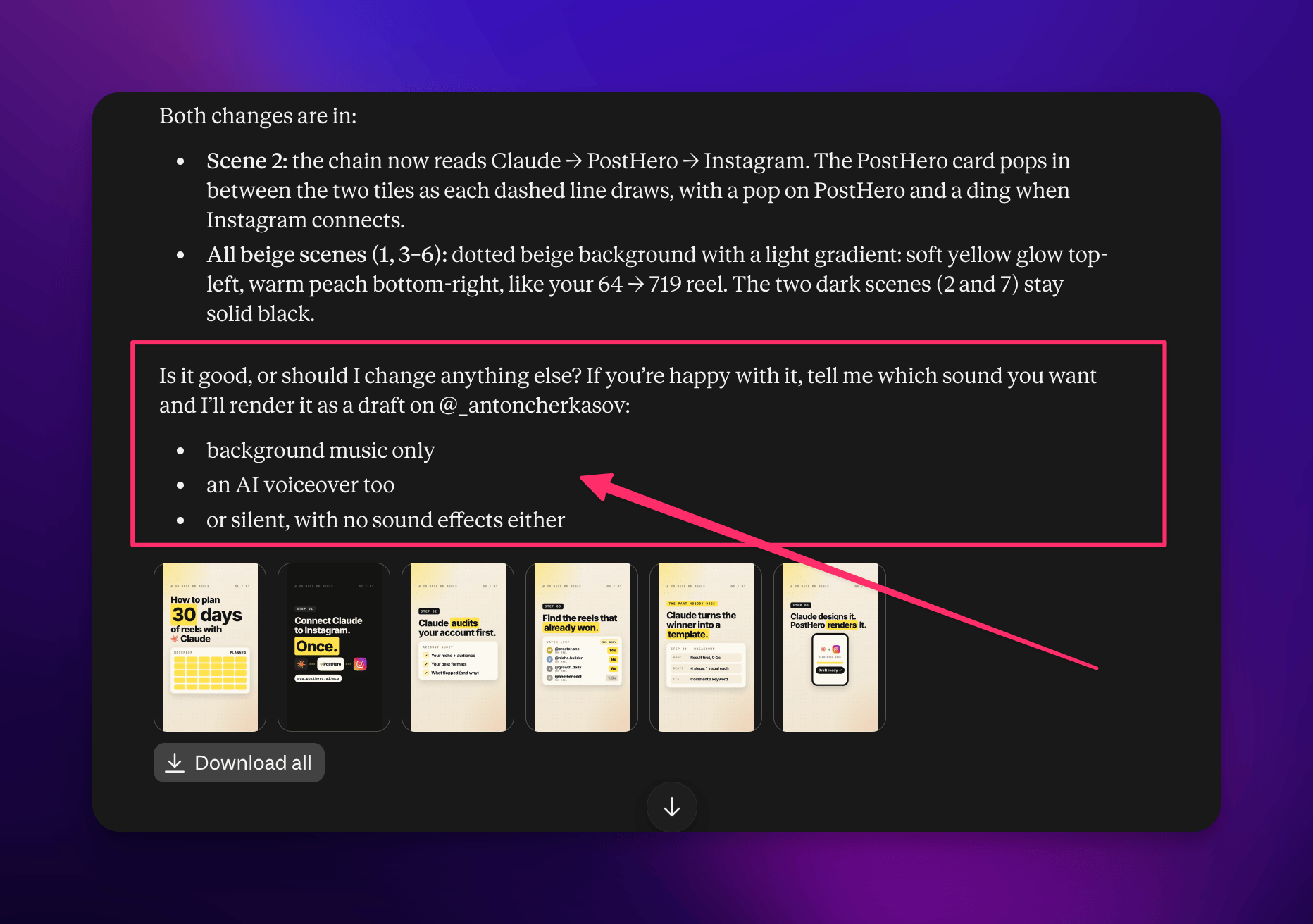
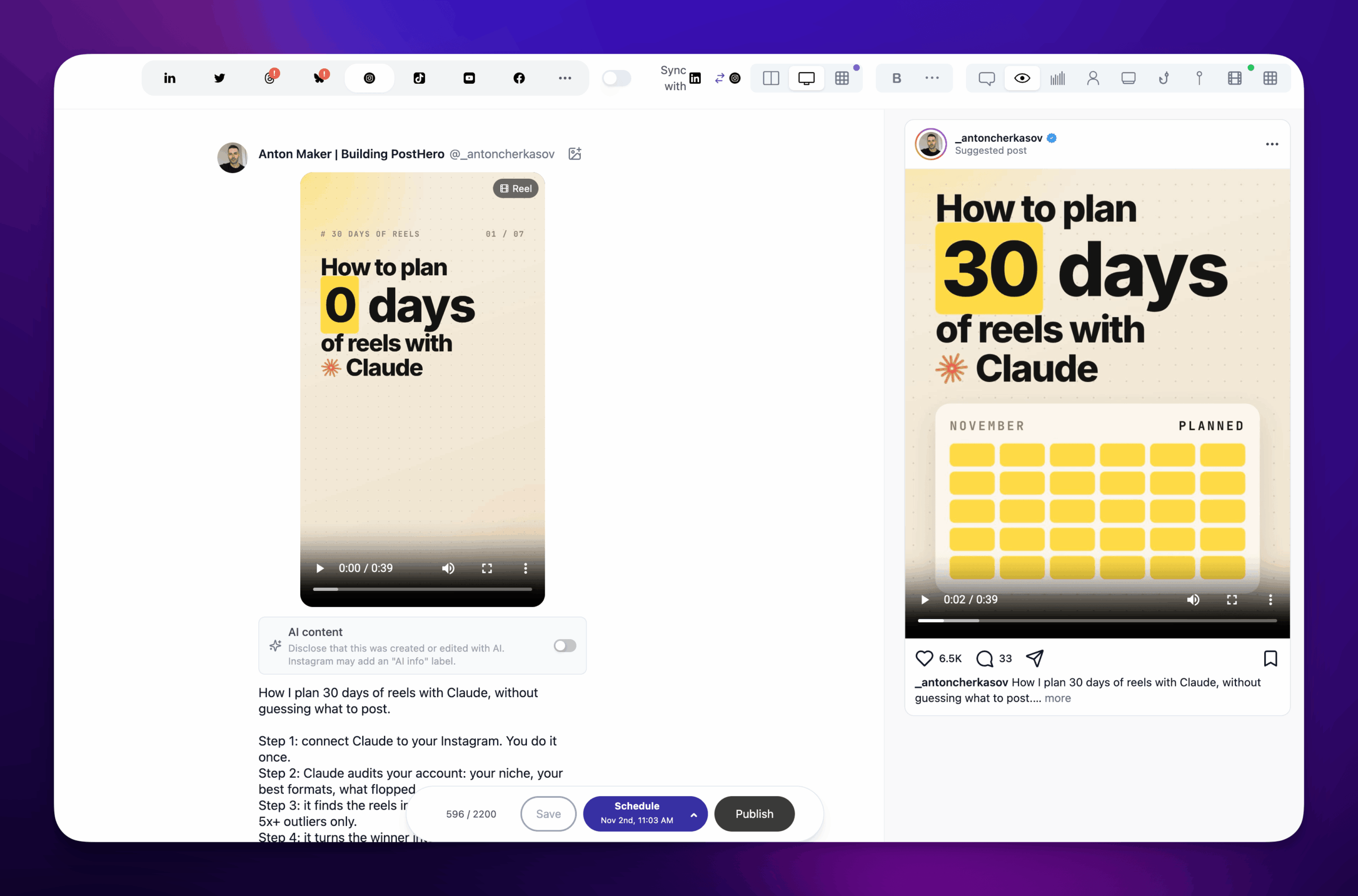
Then it renders. About a minute later the video is in my media library and saved as a draft.
Step 4: Fix the timing, then post it
Then I watch it. A scene that’s too fast to read gets re-timed and re-rendered on the same draft. Music and voice can still be added or changed after the video is done.
After that, the same file goes wherever I want it. For example, it can go out as an Instagram reel (I cover that side in detail in making Instagram reels with Claude). It can also be a TikTok, which Claude can send to your TikTok inbox so you finish it in the app: see the Claude TikTok guide. And as a YouTube Short it needs a title of its own, so check the Claude YouTube guide. Each platform still gets its own caption.
Everything stays a draft until I say otherwise. Claude schedules only when I give it a time, and publishes right away only when I ask and confirm once more.
The result: 64 views to 719
719 views. My reels usually get around 64. That’s about 11x, from changing how I asked.
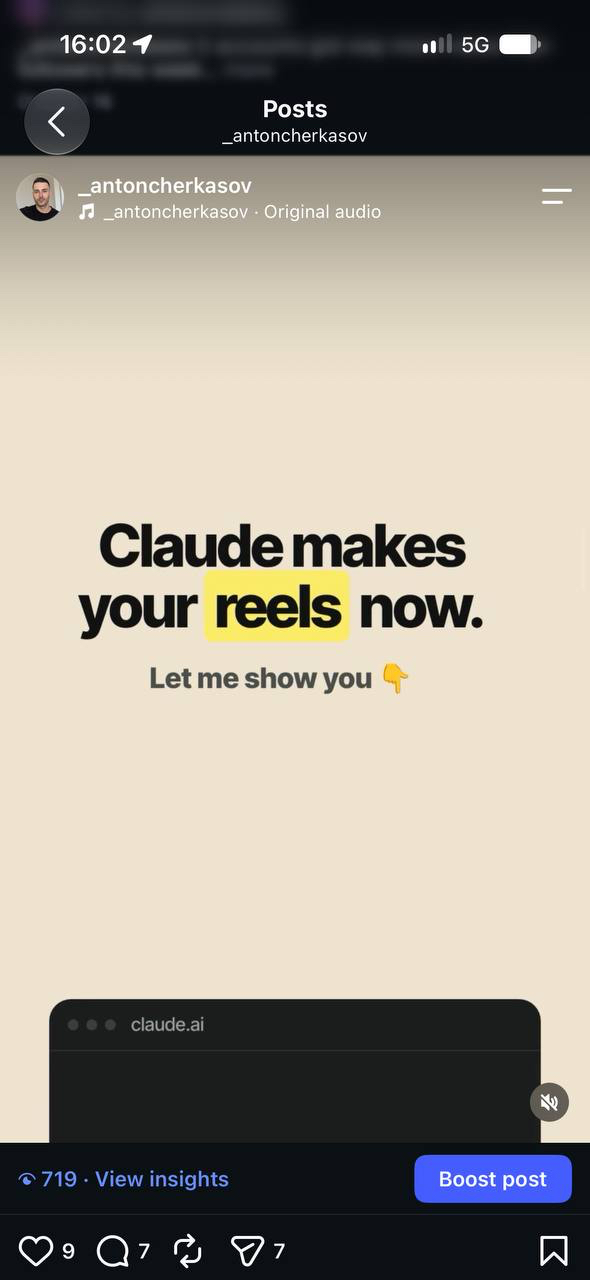
The detail I find most useful: two other reels of mine on the same topic, built differently, got 21 and 19 views. Same subject and same account, so the structure made the difference. And the structure came from the breakdown.
One reel doesn’t prove a law, and 719 views is still a small number. But it matched what I kept seeing afterwards: what top creators are doing right now teaches Claude more than any description of my niche. Those lessons also went back into the product, because every weak video showed us something to fix in how the connector renders.
Also, expect a few attempts. Good videos take several tries for anyone, whether you use AI or not. So a first one that comes out average is the normal start of learning a skill.
Copy-paste prompts for Claude animation
Swap the bits in brackets for your own.
Prompts to test an idea and find a reference
The first one needs no connector, so you can try it right now.
Make a looping SVG animation of [idea] as an artifact. Vertical 9:16, three colors at most, big readable text, and nothing moving faster than I can read.
Search the viral reels library for [niche] from the last 14 days, sorted by views compared to followers. Then show me the covers of the top 5. I only want faceless ones: text and graphics, nobody talking to the camera.
Break down this video: [link, or describe it and paste the transcript]. Tell me what’s on screen in the first 2 seconds, the scenes with timestamps, and why it beat the creator’s usual numbers. Then turn it into a fill-in-the-blank scene template.
Prompts to design and post your Claude animation
Using that template, design a 20-second faceless animated video about [topic] for [Instagram / TikTok / YouTube Shorts], with text and motion graphics only. Plan it scene by scene first, then show me the storyboard. Don’t render until I say yes.
In scene 2, make the number count up from 0 to [number]. Then in scene 4, draw an underline under “[word]”. Also keep the headline visible on the first frame of scene 1.
Add calm background music and a voiceover that adds to the on-screen text instead of reading it out. Show me the track and every line before you render.
Scene 3 is too fast to read, so give it another second and re-render on the same draft.
Use the same video for an Instagram reel, a TikTok and a YouTube Short. Write each one its own caption, and also give the Short a title under 60 characters. Then save all three as drafts, but don’t publish.
New to the connector? Then start with the guide to connecting Claude to Instagram, which has the setup with screenshots.
FAQ
Can Claude make animations?
Yes, because Claude writes animations as code: SVG, CSS and HTML in the chat, or scenes that a renderer turns into video. It animates text, shapes, charts and images. To get a video file, though, you need Claude Motion, a code setup like Remotion, or a connector that renders, such as PostHero.
Can Claude make faceless videos?
Yes, as long as a tool renders them. For a Claude faceless video through PostHero, Claude designs the scenes (animated text, graphics, photos), then you approve the storyboard, and PostHero renders a vertical video with music or a voiceover.
Do I need to know how to code?
Not for an artifact, Claude Motion or PostHero, since you describe what you want in plain words. But Remotion and most Claude Code skills need a terminal and a few things installed first.
Is Claude animation free?
Partly, because it depends on the route. Claude Motion is in beta on Team and Enterprise plans. For the PostHero route, Claude’s Free plan allows one custom connector, which is all this needs, and PostHero also has a 7-day free trial.
What’s the difference between Claude Motion and Claude Design?
Claude Motion makes short animations and exports them as MP4, while Claude Design makes designs and interactive prototypes, and its export list is HTML, PDF and PPTX. So for a video, Motion is the one to look at.
Can the same Claude animation go to Instagram, TikTok and YouTube Shorts?
Yes, once those accounts are connected in PostHero. Then ask Claude to save the finished video as a reel, a TikTok and a Short from the same chat, each with its own caption.
Will Claude post the video without asking me?
No, because every video lands as a draft. It’s scheduled only when you give Claude a time, and published right away only when you ask and confirm once more.
Does this work in ChatGPT too?
Yes. The same connector address also works as a custom connector in ChatGPT, with the same tools and drafts.
PostHero for Claude
Make your first Claude animation
Connect in 2 minutes. Then start from a real viral video, approve the storyboard, and get a finished faceless video as a draft.
7-day free trial. Everything starts as a draft.